


Unsora/Claude skills
Best Claude Skills for Video and Image Creation
By Irfan Sadek, co-founder of Unsora · Last updated:
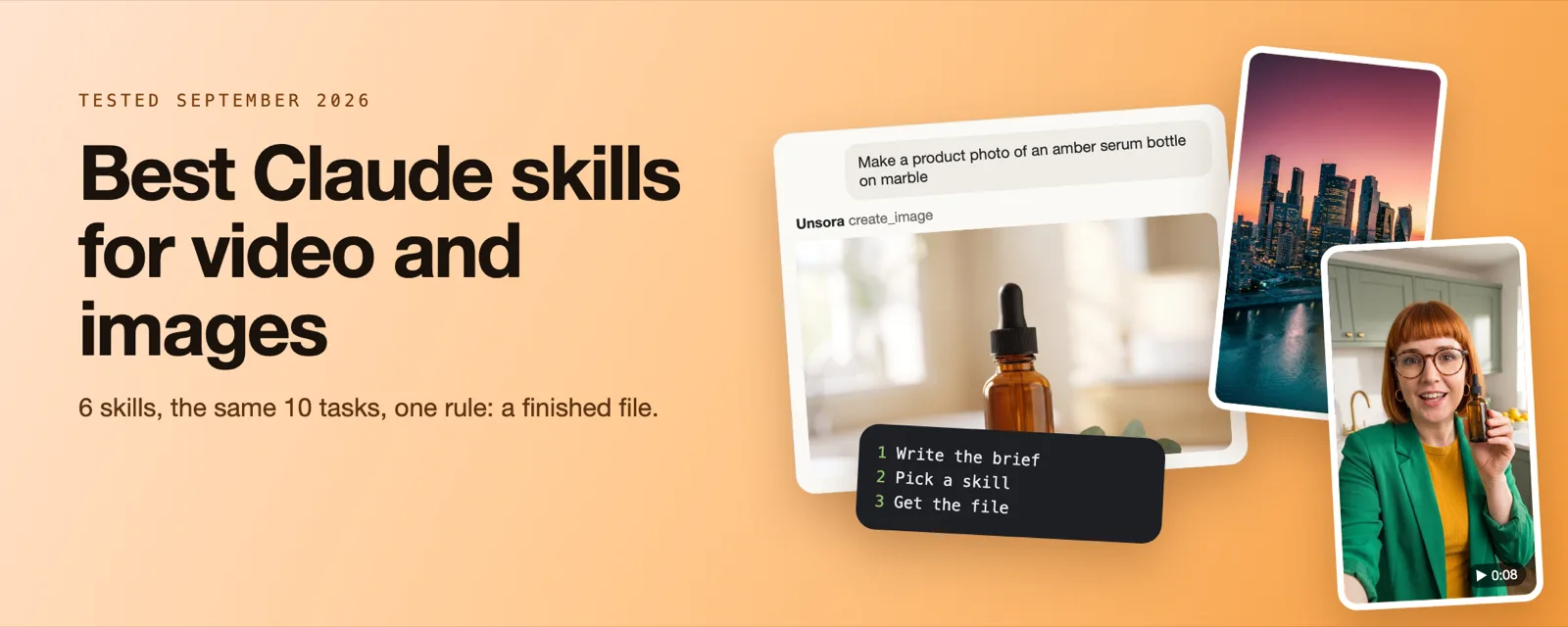
The best Claude skills for video and image creation depend on the kind you need. Use a skill with a connector (Unsora, Higgsfield) for real photos and clips, or a code skill (Remotion, HyperFrames) for exact motion graphics. In our 60-job test, Unsora's skills finished 8 of 10 tasks.
Key takeaways
- Claude can't generate photos or video on its own. A skill tells it how to do the job, and a connector or API does the rendering.
- In our test of 60 jobs (6 skills, the same 10 tasks each), 55% came back as a finished file on the first prompt. Unsora's skills led with 8 of 10, Higgsfield's connector returned 7 of 10 and Remotion 3 of 10.
- Connector-based skills in claude.ai reached a first finished file in 4.5 minutes. Skills that need Claude Code, API keys and local tools took 17.5 minutes.
- Skills are free to install. You pay for the generation: a median $0.08 per finished image and $3.90 per finished 10-second clip in our test, failed runs included.
- Only Remotion got a text-heavy explainer right. AI video models still misspell words on screen, so use a code-rendered skill for titles and captions.
- On September 29, 2026 we checked 11 third-party install paths. 10 resolved. The widely shared
remotion/agent-skillspath points to a repository that doesn't exist.
The pages that rank for Claude skills today mix three different things: skills that render a file, skills that call an image or video model, and skills that only write a prompt. Install the wrong kind and you get a prompt back, not a file.
They are also written for Claude Code only. None of the pages Google's AI Overview cites for this question that we could read in full mentions claude.ai, none tests whether a skill returns a file, and one of them still recommends Sora 2, whose API OpenAI shut down on September 24, 2026.
So we ran the same 10 tasks through 6 skills, timed the setup from zero, priced every finished file and checked every install command. The picks by job are below, then how to install and run one step by step.
Which Claude skill should you use for each job?
Pick by the job and by where you use Claude. Connector-based skills (Unsora, Higgsfield) work in claude.ai and return photos and clips. Claude Code skills (Pexo, inference.sh, QuickDesign) reach more models but need API keys and a terminal. Remotion renders exact motion graphics from code.
If you use Claude in the browser, pick a connector-based skill. In Claude Code, all six work.
| Job | Best skill | Kind | Works in | Finished files in our test | Setup to first file | You pay for |
|---|---|---|---|---|---|---|
| AI video and images from claude.ai | Unsora skills + MCP | Model-calling, via connector | claude.ai and Claude Code | 8 of 10 | 4 minutes | Unsora credits |
| Images from claude.ai | Higgsfield connector | Model-calling, via connector | claude.ai (Claude Code via its CLI) | 7 of 10 | 5 minutes | Higgsfield credits |
| Multi-shot video agent | Pexo | Model-calling skill | Claude Code | 6 of 10 | 12 minutes | Pexo credits |
| The most image models from one CLI | inference.sh | Model-calling skill | Claude Code | 5 of 10 | 14 minutes | inference.sh usage |
| One plugin for images, UGC and promos | QuickDesign | Model-calling plugin | Claude Code | 4 of 10 | 21 minutes | QuickDesign credits |
| Titles, captions and explainers from code | Remotion (HyperFrames not tested) | Code-rendered | Claude Code | 3 of 10 | 26 minutes | Nothing for rendering |
| Free posters, generative art and GIFs | Anthropic canvas-design, algorithmic-art, slack-gif-creator | Code-rendered | claude.ai and Claude Code | Not tested | Switch on in Customize → Skills | Nothing |
Can Claude make images and videos on its own?
No. Claude doesn't generate photos, illustrations or video by itself. It writes SVG, HTML, charts and code, and it needs a skill plus an image or video model, reached through a connector or an API, to hand you a real file.
Anthropic says so directly in its help center: "Claude doesn't generate photos or illustrations the way image-generation tools do" ( Can Claude produce images?, March 16, 2026). What Claude does well on its own is structured visuals: diagrams, charts, SVG icons, HTML mockups and interactive artifacts. It can also read and critique images you upload.
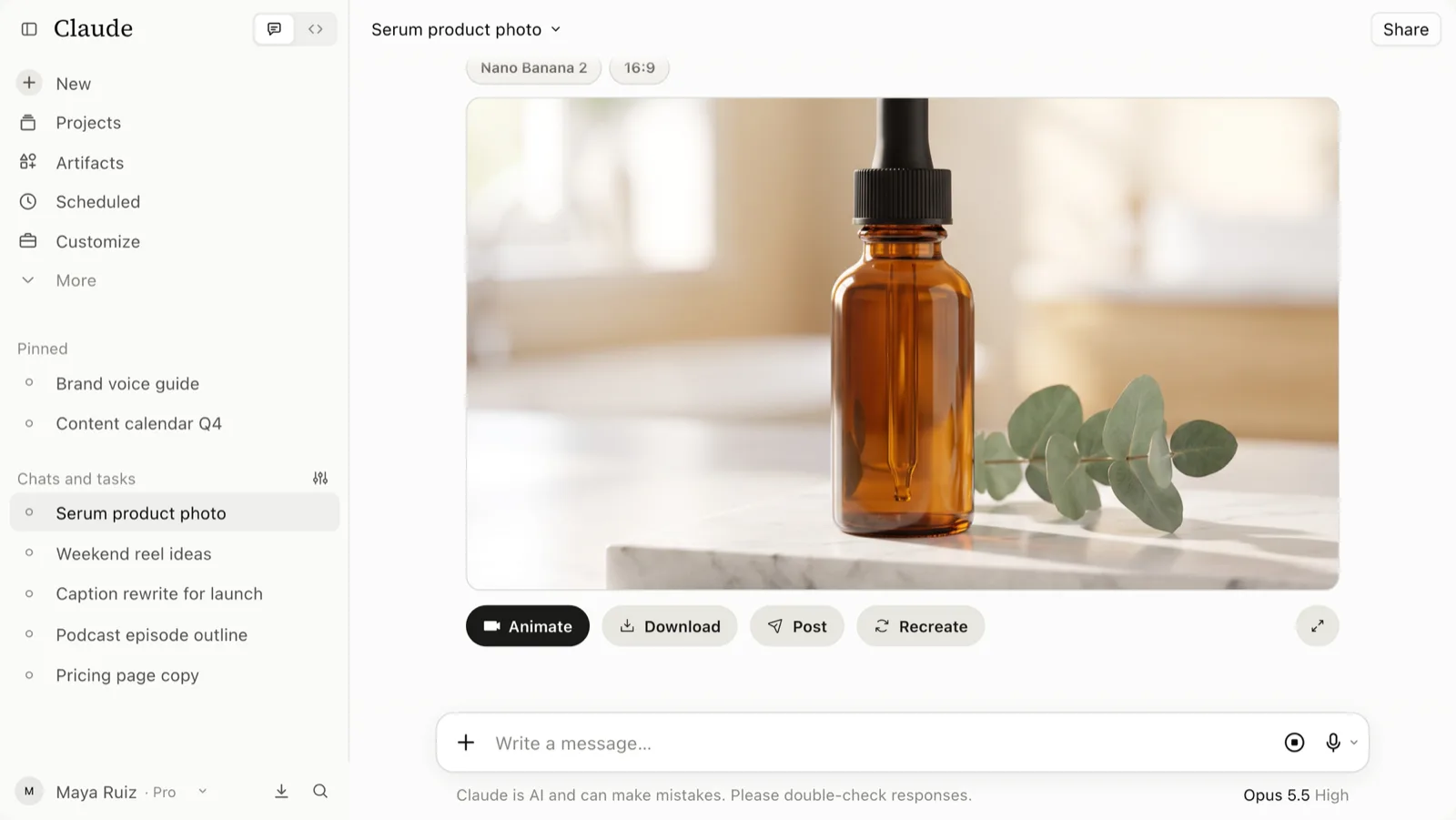
Ask plain Claude for "a product photo of a serum bottle" and you get an SVG drawing. Ask the same thing with the Unsora connector switched on and Claude sends the request to an image model and shows the finished photo in the chat.
What kinds of Claude skills make images and video?
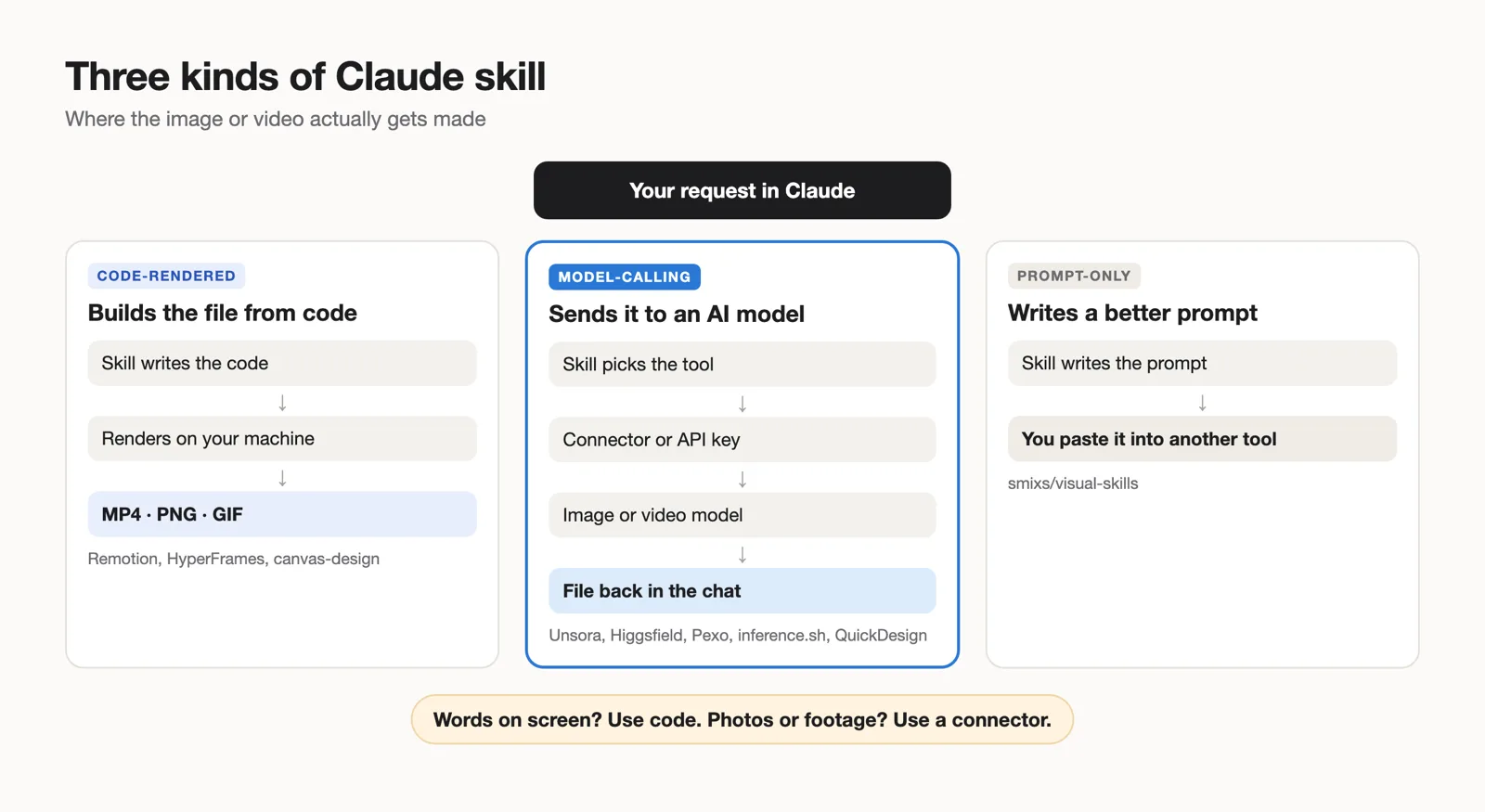
There are three kinds, and they behave differently. Code-rendered skills build the file from code on your machine. Model-calling skills send your prompt to an image or video model and return its file. Prompt-only skills write a better prompt and render nothing.
| Kind | What you get | Examples | What it needs | Works in |
|---|---|---|---|---|
| Code-rendered | An exact file built from code: MP4, PNG, GIF, PDF | Remotion, HyperFrames, Anthropic canvas-design, algorithmic-art, slack-gif-creator | A local renderer (Node, a headless browser) for video; code execution for images | Claude Code; Anthropic's image skills also in claude.ai |
| Model-calling | A photo or video clip from an AI model | Unsora, Higgsfield, Pexo, inference.sh, QuickDesign, aviz85's Image & Video Generation, Atlas Cloud | A connector or an API key, plus credits | claude.ai for connector-based skills; Claude Code for CLI skills |
| Prompt-only | A model-specific prompt you paste elsewhere | smixs/visual-skills | Nothing | Anywhere |
Skill, connector or plugin: what's the difference?
A skill is a folder with a SKILL.md file of instructions, plus optional scripts and resources, that Claude loads when a task calls for it. Anthropic introduced skills on October 16, 2025 (Agent Skills) and published the format as an open standard at agentskills.io. A connector is an MCP server you add under Customize → Connectors; it gives Claude tools it can call, such as "make an image". A plugin is a Claude Code bundle that can ship skills, commands and servers together.
For media, you usually need two of them. The skill is the recipe. The connector renders the file. That is the same three steps our skills page uses: install the skill, connect the MCP, then ask.
Which kind do you need?
- You need exact text, brand colors or motion that repeats frame for frame: use a code-rendered skill.
- You need photos, people, products or real-looking footage: use a model-calling skill with a connector.
- You work in claude.ai in the browser: pick a connector-based skill, because CLI skills need a terminal.
- You already pay for a generator you like: a prompt-only skill will improve your prompts for it.
We ran 60 image and video jobs through 6 Claude skills. Which returned a finished file?
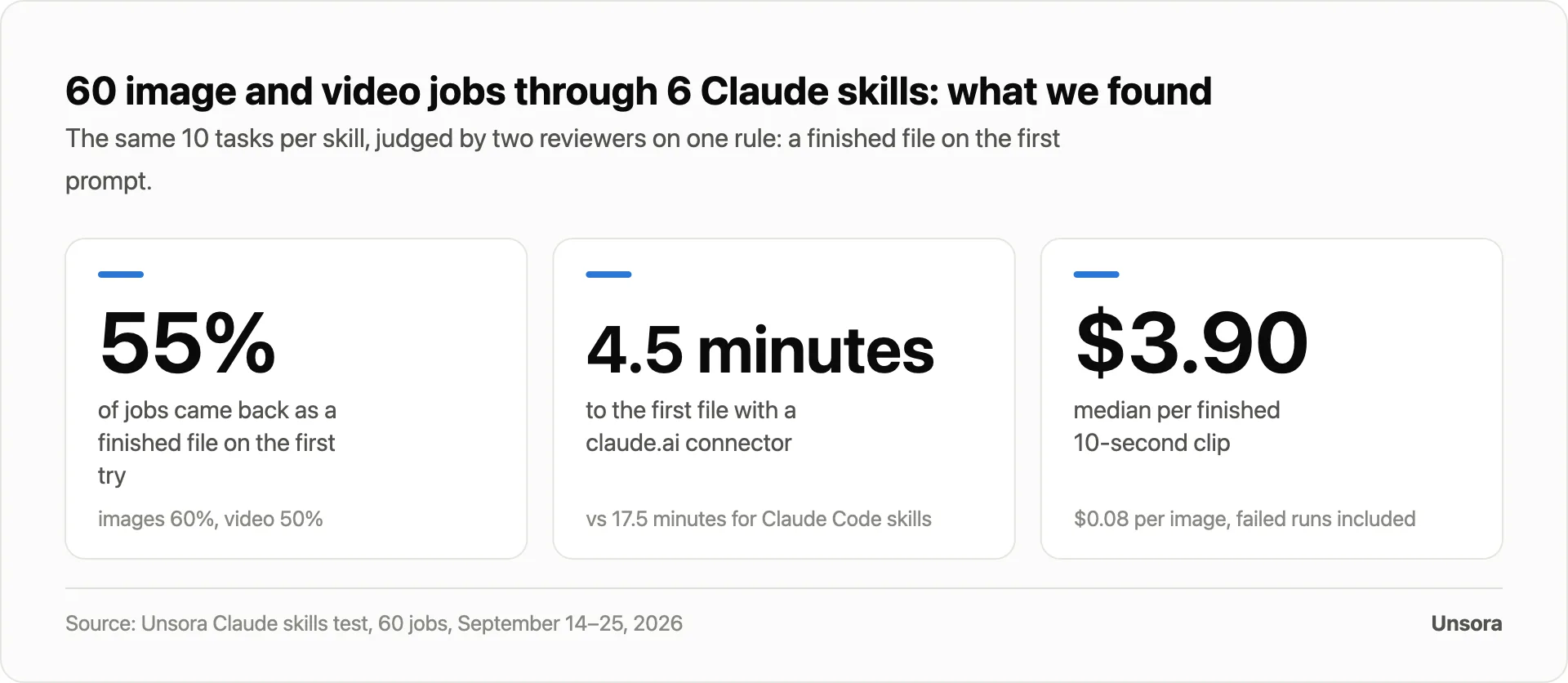
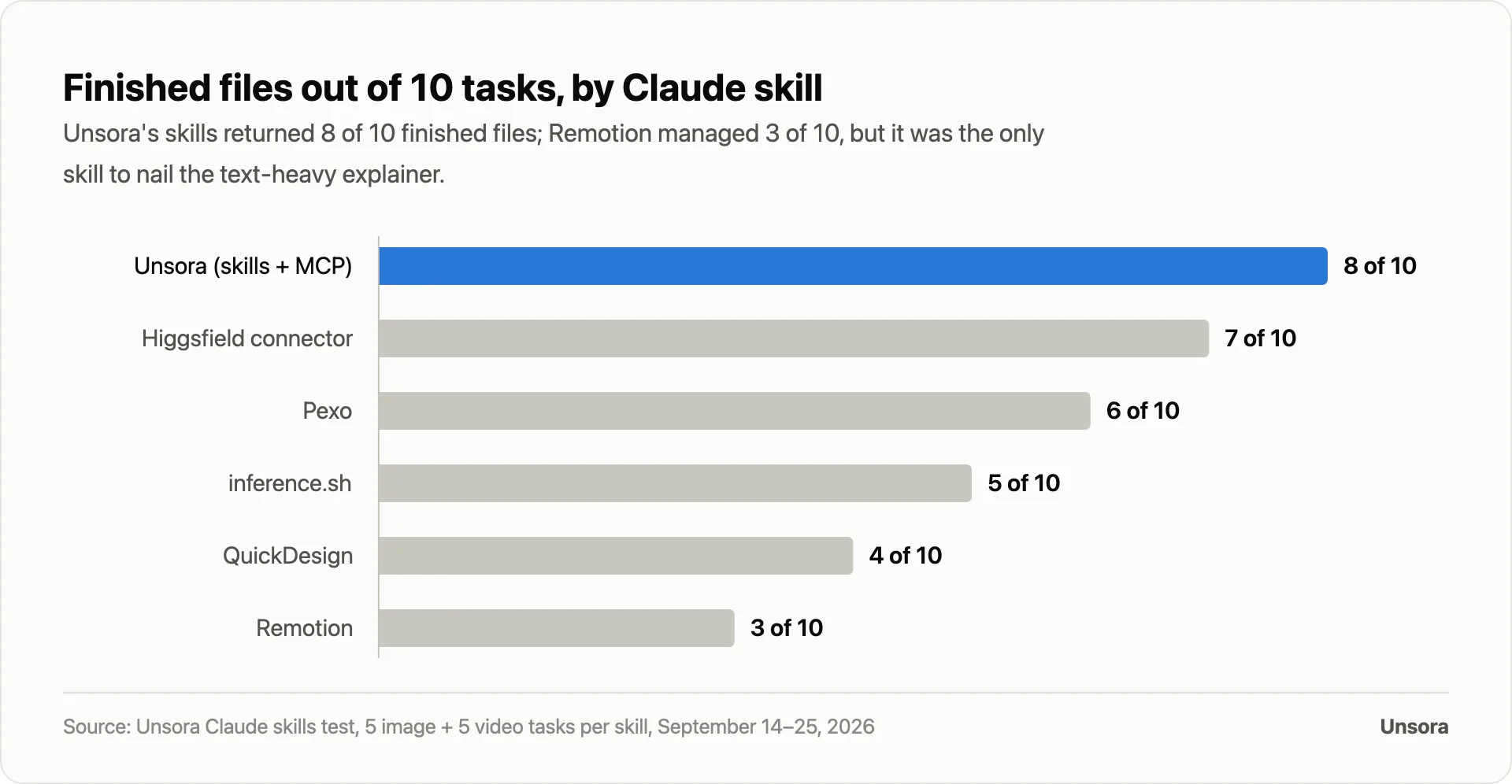
55% of 60 jobs came back as a finished file on the first prompt. Unsora's skills returned 8 of 10, Higgsfield's connector 7 of 10, Pexo 6 of 10, inference.sh 5 of 10, QuickDesign 4 of 10 and Remotion 3 of 10.
How we tested. Between September 14 and 25, 2026 we ran six skills through the same ten tasks. Five were image tasks: a product photo, a YouTube thumbnail with a three-word headline, a quote card with exact text, a lifestyle photo of a generated person, and a background edit of a supplied photo. Five were video tasks: an 8-second UGC-style selfie clip, a 10-second cinematic b-roll shot, a 5-second image-to-video push-in, a 15-second explainer with three lines of on-screen text, and a 10-second product ad ending on a text card.
Each task ran once per skill, in a fresh chat, with the same wording. Only the first prompt counted. Two reviewers scored every file blind, with a third breaking ties. A job passed when it returned a downloadable file of the right type and aspect ratio, with the right subject and any required text spelled exactly, with no second prompt.
One tester timed each skill from a clean profile with nothing installed until the first finished file was saved. Cost is everything we were charged for a task type, including failed runs, divided by the finished files, at each tool's entry paid plan price. We used no Sora models.
Finding 1: model-calling skills with a connector finished the most jobs
Across all six skills, image tasks passed 60% of the time and video tasks 50%. Unsora's skills finished 8 of 10 tasks. Higgsfield's connector finished 7 of 10 and was the only skill to pass all five image tasks.
Finding 2: setup, not the model, decided most of the misses
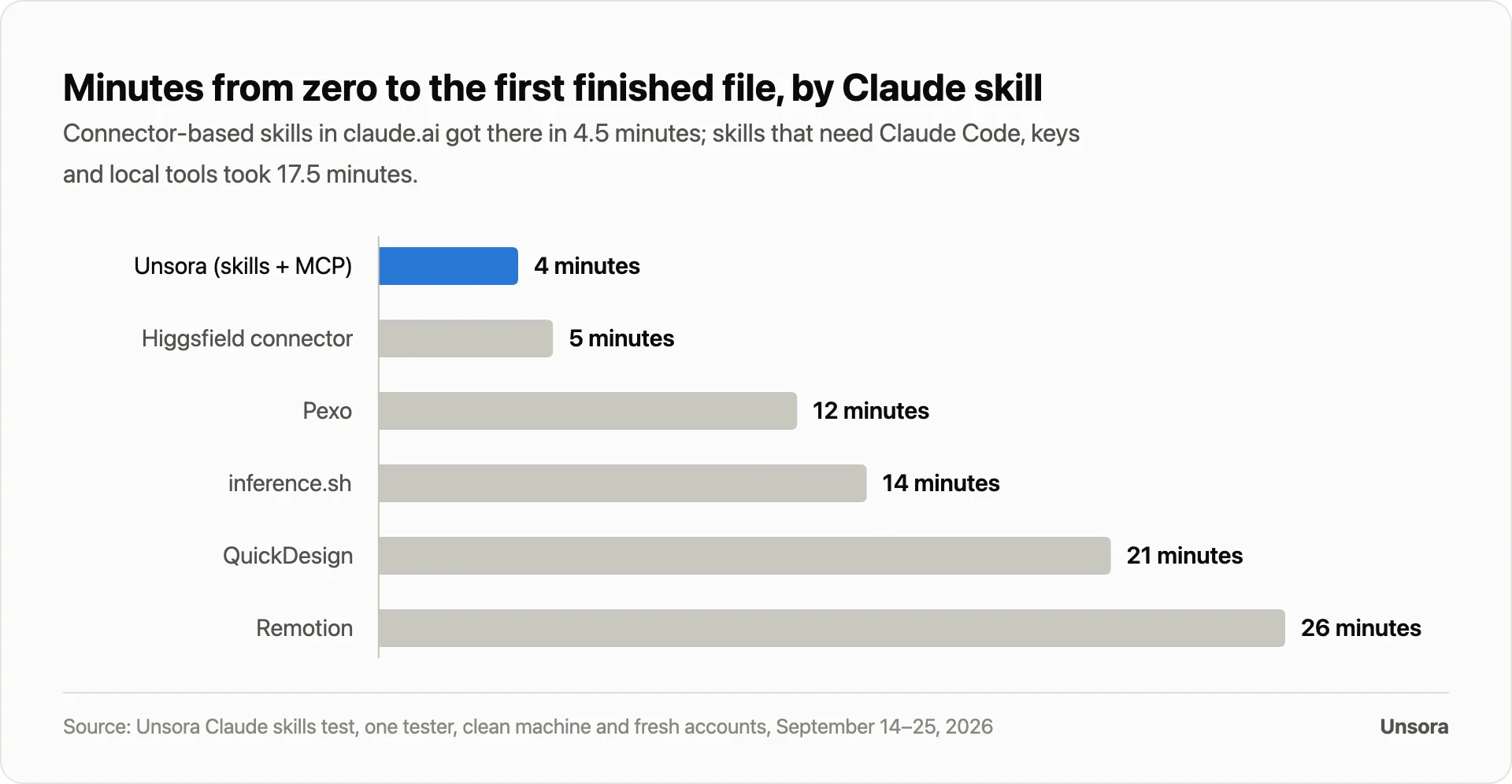
Connector-based skills in claude.ai reached a first finished file in 4.5 minutes. The four skills that need Claude Code, an API key and local tools took a median of 17.5 minutes, and Remotion took the longest at 26 minutes because it needs a Node project and a headless render.
Setup caused 11 of 27 misses: a missing key, a missing dependency such as ffmpeg, or a blocked network call.
Finding 3: only code got the words right
Remotion was the only skill to pass the explainer with three lines of on-screen text. Every model-calling skill misspelled or garbled at least one line. Remotion failed every task that needed a photo or real footage, which is why it finished only 3 of 10.
Finding 4: a finished clip costs dollars, a finished image costs cents
The median cost was $0.08 per finished image and $3.90 per finished 10-second clip across the five model-calling skills, with failed runs counted. Remotion's renders cost nothing beyond your own machine. Only 2 of 6 skills ran end to end inside claude.ai in the browser.
| Skill | Finished files | Minutes to first file | Runs in | Biggest miss |
|---|---|---|---|---|
| Unsora skills + MCP | 8 of 10 | 4 minutes | claude.ai, Claude Code | Quote card text, explainer text |
| Higgsfield connector | 7 of 10 | 5 minutes | claude.ai | Vertical UGC clip, explainer text |
| Pexo | 6 of 10 | 12 minutes | Claude Code | Setup (key), explainer text |
| inference.sh | 5 of 10 | 14 minutes | Claude Code | Setup (CLI and key) |
| QuickDesign | 4 of 10 | 21 minutes | Claude Code | Setup (Node, ffmpeg) |
| Remotion | 3 of 10 | 26 minutes | Claude Code | Any photo or footage task |
What this means for you:
- Start in claude.ai with a connector-based skill if you want files fast. You skip keys and local installs.
- Move to Claude Code when you need a specific model, batch runs or a skill that assembles a longer film.
- Put any words on screen with a code-rendered skill, or add them in an editor. Don't ask an AI video model to spell.
- Budget for retries. Only 50% of video jobs passed on the first try, so plan at least one retry per clip.
Best for AI video and images from claude.ai: Unsora skills + MCP
Unsora's skills run through the Unsora MCP connector, so Claude hands back finished images and clips inside the chat. They finished 8 of 10 tasks in our test and reached a first file in 4 minutes.
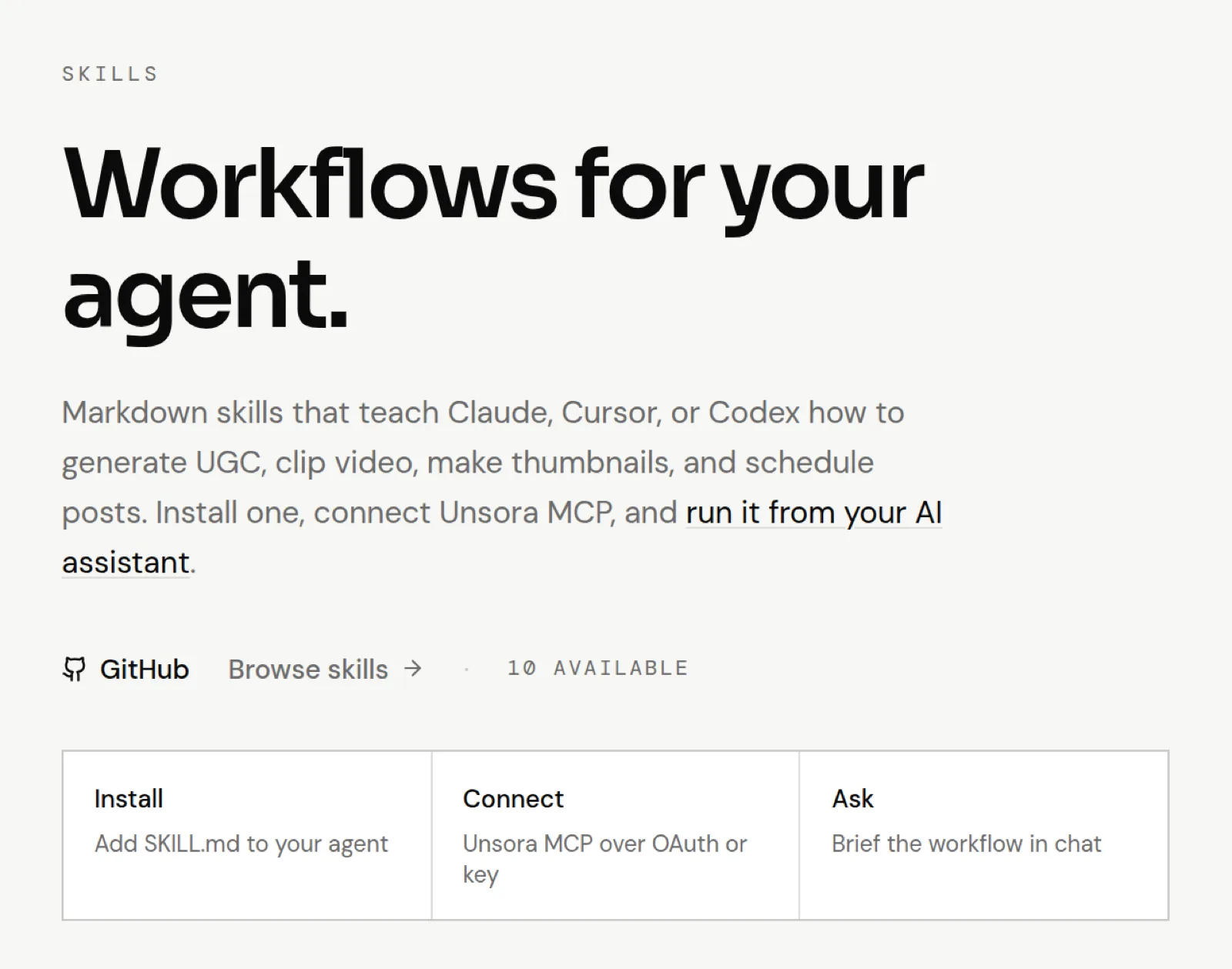
Unsora publishes ten skills on its skills page.
The four you'll use most for media:
- Create Video: text-to-video and image-to-video, 4–15 second clips, with reference frames.
- UGC Generator: selfie clips, talking-head ads and product demos from a product brief, 9:16 by default.
- Create Thumbnail: 16:9 YouTube thumbnails with face and template references, 1 to 10 variations.
- Media Router: one skill that sends any media request to the right tool and checks your credits before it spends them.
Behind the connector sit current image models (Nano Banana 2 and Pro, Seedream v5 Lite, GPT Image 1.5 and 2) and video models (Seedance 2.5, Kling 3, Veo 3.1, Gemini Omni Flash). In claude.ai each job opens a live preview panel in the chat, so you see the thumbnail or play the clip without leaving the conversation.
Four more skills produce whole short films in a set style: a faceless doodle explainer, a Vox-style collage video, a paper diorama film and an ink-wash animation. They generate the images, clips and music through the connector, then stitch the film with ffmpeg on your machine, so they need Claude Code.
Price. Unsora's plansare $19 a month for 500 credits, $39 for 1,100 and $149 for 5,000, with a 3-day trial. In Unsora's app, a 1K image costs 2 credits and a 5-second Seedance clip 64 (checked September 29, 2026).
Where others beat it. Higgsfield passed all five image tasks; Unsora missed the exact-text quote card. Remotion beat it on on-screen text. The style-film skills need a local setup. We make Unsora, and we scored it with the same rubric as everyone else.
Best for images inside claude.ai: Higgsfield's connector
Higgsfield's MCP connector adds its image and video models to claude.ai in a few clicks. It passed all 5 image tasks in our test, the only skill to do so, and got to a first file in 5 minutes.
You add it as a custom connector with the address https://mcp.higgsfield.ai/mcp, then sign in with your Higgsfield account (Higgsfield setup page). Higgsfield says it offers "15+ leading image models", including Nano Banana Pro, Seedream, FLUX and GPT Image, with free renders to start and paid credits after that. In Claude Code, Higgsfield points you to its CLI instead.
Video was its weak side. It missed the vertical UGC selfie clip and garbled the explainer text.
Best multi-shot video agent in Claude Code: Pexo
Pexo's agent skill plans a multi-shot video, picks a model for each shot and returns the cut. It finished 6 of 10 tasks, but it needs Claude Code and a Pexo API key, and setup took 12 minutes.
Install it with npx skills add https://github.com/pexoai/pexo-skills --skill pexo-agent. The pexo-skills repository holds 20 skills under an MIT license, from text-to-video to TikTok ads.
Pexo beats a single-clip skill when you want several shots assembled from one prompt. One caution: Pexo's own comparison page still lists Sora 2 among its models, and the Sora API closed on September 24, 2026.
Best for the most image models from one CLI: inference.sh
inference.sh puts 50+ image models and 40+ video models, including FLUX, Gemini, Seedance and Veo, behind one command-line tool in Claude Code. It finished 5 of 10 tasks in our test, and most of its misses were setup.
Install the skills with npx skills add inference-sh/skills or as a Claude Code plugin, then install the belt CLI and log in (inference-sh/skills). The repo has separate skills for general image generation, FLUX, Nano Banana 2 and GPT Image, and for Seedance, Veo and image-to-video.
It wins on range. If you want to try a niche model or a cheaper per-image option, it had the most models of the six we tested.
Best all-in-one plugin: QuickDesign
QuickDesign bundles image generation, UGC ads, promos and multi-scene video in one Claude Code plugin. It finished 4 of 10 tasks, held back by setup, and took 21 minutes to a first file.
Install it with three commands: /plugin marketplace add ottasilver/quickdesign-cli, /plugin install quickdesign@quickdesign, then npm install -g @quickdesign/cli. It needs Node.js 18.17 or later, and its multi-segment videos use ffmpeg (quickdesign-cli).
QuickDesign moved fast after the Sora shutdown: version 0.11.0 marks Sora 2 as retired and routes those requests to Seedance 2.5 or Flux 3.
Best for code-rendered video: Remotion (and HyperFrames)
Remotion's official skill teaches Claude to build a video in React and render it on your machine, so text, timing and brand colors come out exactly as written. It finished only 3 of 10 tasks because it can't make photos or real footage, but it was the only skill to pass the text explainer.
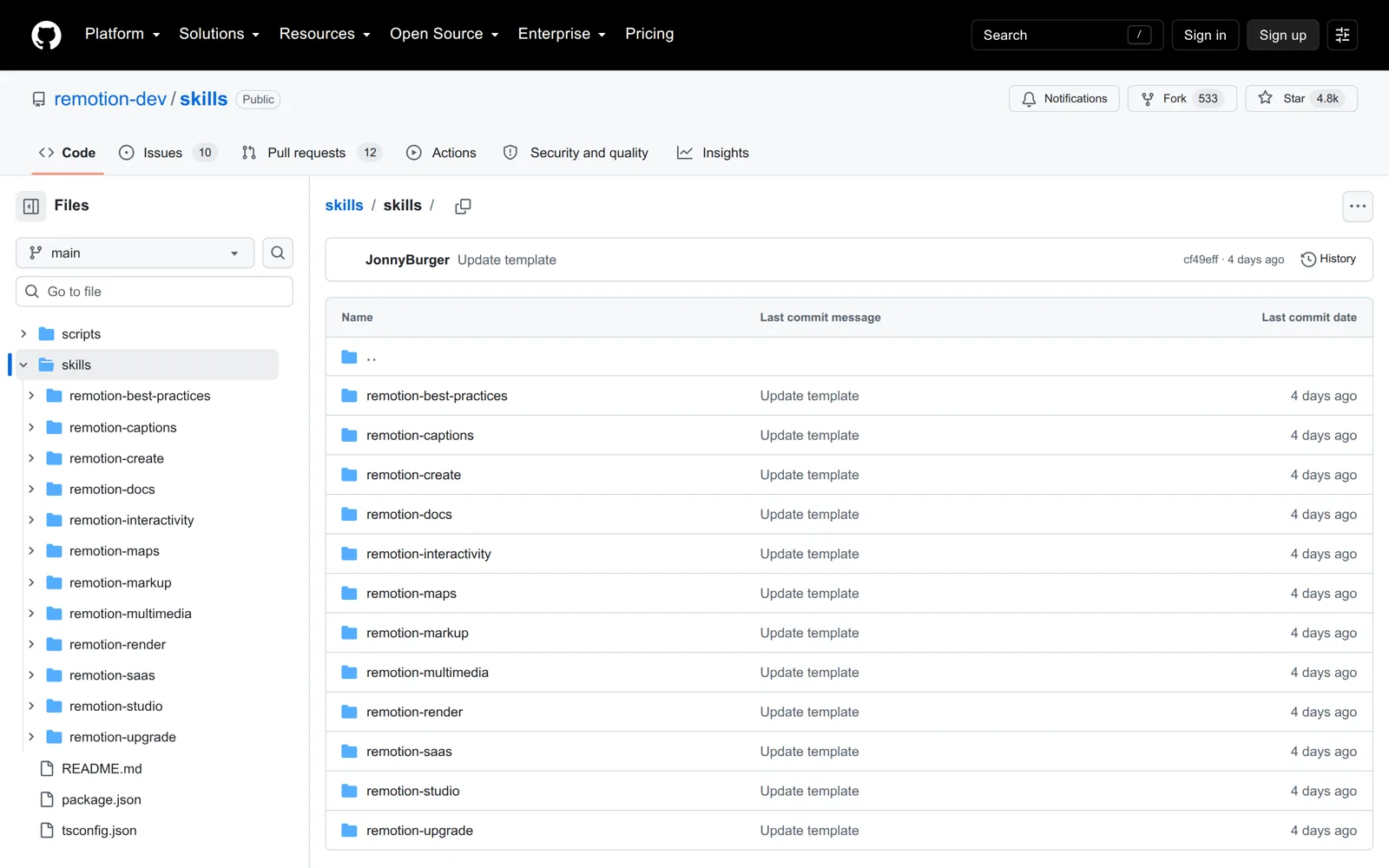
Install it with npx skills add https://github.com/remotion-dev/skills --skill remotion-best-practices. The remotion-dev/skills repository has 12 skills, covering captions, rendering, maps and more. Some lists give remotion/agent-skillsinstead; that repository returned "Not Found" when we checked on September 29, 2026.
Setup took 26 minutes, the longest in our test, because Remotion needs a Node project and a headless render. Rendering costs nothing per video. Remotion is free for individuals, non-profits and for-profit companies with up to 3 employees; larger companies need a Company License (Remotion license).
HyperFrames, from HeyGen, is the other code-rendered option: HTML-based video compositions with more than 20 skills for explainers, captions and product launches, under an Apache-2.0 license. We didn't include it in the test.
Which free Claude skills make images?
Anthropic's own skills include canvas-design, algorithmic-art and slack-gif-creator. They make posters, generative art and animated GIFs from code at no cost, and they run in claude.ai once code execution is on. They can't make photos.
All three live in the anthropics/skillsrepository. In claude.ai, turn on code execution under Settings → Capabilities, then switch on Anthropic's example skills or upload a skill in Customize → Skills (Use skills in Claude).
The free prompt-only option is smixs/visual-skills. It writes model-specific prompts for Seedance, Kling, Veo and Nano Banana, but it renders nothing, so pair it with a connector.
| Free skill | What it makes | Runs in | Limit |
|---|---|---|---|
| canvas-design | Posters and static designs as PNG or PDF | claude.ai, Claude Code | No photos |
| algorithmic-art | Generative art in p5.js, with an interactive HTML viewer | claude.ai, Claude Code | No photos |
| slack-gif-creator | Small animated GIFs sized for Slack | claude.ai, Claude Code | Short, simple loops |
| smixs/visual-skills | Prompts for image and video models | Anywhere | Renders nothing |
How do you install and run a Claude skill for images and video?
On claude.ai you upload the skill in Customize → Skills and add a connector in Customize → Connectors, then ask in any chat. In Claude Code you add the skill folder or run one install command, add the MCP server with claude mcp add, and ask.
In claude.ai (browser or desktop app)
- 01Add the skill.Download the skill's folder (it must contain SKILL.md), zip it with the folder at the root, and upload the .zip in Customize → Skills. Code execution must be on under Settings → Capabilities (How to create custom skills).
- 02Add the connector. Go to Customize → Connectors, click +, choose Add custom connector, paste
https://mcp.tryunsora.com/mcpand click Add. Claude's Free plan allows one custom connector (Custom connectors). - 03Sign in. Log in to Unsora when prompted. There is no key to paste.
- 04Ask.In any chat, click +, open Connectors, switch Unsora on, and ask: "Make 4 YouTube thumbnails for a video about AI UGC ads."
In Claude Code
- 01Add the skill. Put the skill folder at
~/.claude/skills/<skill-name>/SKILL.md, or run the skill's install command, such asnpx skills add https://github.com/remotion-dev/skills --skill remotion-best-practices. - 02Add the MCP server. Run
claude mcp add --transport http unsora https://mcp.tryunsora.com/mcp --header "apiKey: uns_live_YOUR_KEY". Add--scope userto use it in every project. - 03Check it. Run
/mcpand confirm the server is listed. - 04Ask."Make a 9:16 video of a product demo in a kitchen, 8 seconds."
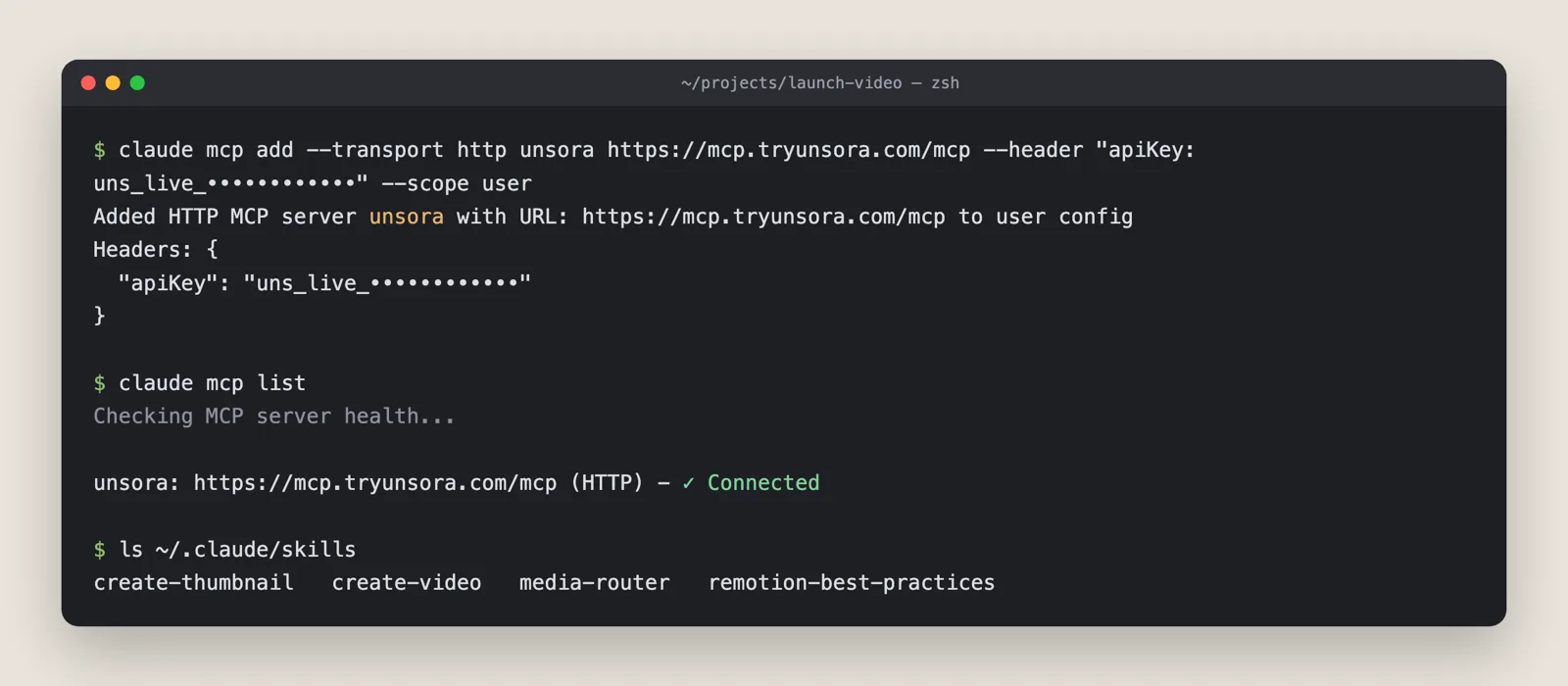
The same connector also works in ChatGPT; the steps are on the MCP setup page.
The install commands we checked
On September 29, 2026 we checked that each published install command points to a repository and a SKILL.md that exist. We didn't run the installers.
| Skill | Command | Result |
|---|---|---|
| Remotion | npx skills add https://github.com/remotion-dev/skills --skill remotion-best-practices | Resolves |
| Remotion (as shared on some lists) | npx skills add remotion/agent-skills | Repository not found |
| inference.sh | npx skills add inference-sh/skills | Resolves |
| Pexo | npx skills add https://github.com/pexoai/pexo-skills --skill pexo-agent | Resolves |
| QuickDesign | /plugin marketplace add ottasilver/quickdesign-cli | Resolves |
| Visual Skills | npx skills add smixs/visual-skills | Resolves |
| Atlas Cloud | npx skills add AtlasCloudAI/atlas-cloud-skills | Resolves |
| HyperFrames, Anthropic skills, aviz85, media-gen-skills | repository paths | Resolve |
What do Claude image and video skills cost?
Skills are free to install. What costs money is the image or video model they call. In our test that came to a median $0.08 per finished image and $3.90 per finished 10-second clip once failed runs were counted.
| Skill | How you pay | Worked example |
|---|---|---|
| Unsora | Credits on a monthly plan ($19 for 500, $39 for 1,100, $149 for 5,000) | A 1K Nano Banana 2 image is 2 credits, about $0.07 on the $39 plan. A 10-second Seedance clip is 127 credits, about $4.50. |
| Higgsfield | Higgsfield credits | Prices on Higgsfield's pricing page |
| Pexo, inference.sh, QuickDesign | Credits or usage billed by each vendor, through your API key | Varies by model |
| Remotion, HyperFrames, Anthropic's skills | Nothing per render; Remotion needs a Company License for for-profit companies with more than 3 employees | Your own machine's time |
Claude itself is a separate cost. Skills and custom connectors work on Claude's Free, Pro, Max, Team and Enterprise plans (skills, connectors), and the Free plan is limited to one custom connector.
What can't Claude skills do yet?
Skills don't give Claude its own image model. Every photo or clip depends on a connector or an API, CLI skills don't run in claude.ai, AI video still misspells words on screen, and some skills still point at models that no longer exist.
- No native generation. Take away the connector or the key and a model-calling skill produces nothing.
- claude.ai has no local shell. Skills that need ffmpeg, Node or a CLI only run in Claude Code. In our test, 2 of 6 skills ran end to end in claude.ai.
- A key per provider. Every CLI skill we tested needed its own account and API key.
- Video is slow.A single clip takes minutes, and Claude can't watch the video it just made to check it.
- Sora is gone. OpenAI shut down the Sora API on September 24, 2026. Skip any skill option that still offers Sora 2.
- Commercial use depends on the tool.Check each vendor's terms. Unsora's plans include commercial rights.
How we chose and tested these skills
We picked the six Claude skills and connectors for media that Google's AI Overview, ChatGPT and GitHub named most often in September 2026. We ran each through the same 10 tasks between September 14 and 25, 2026, and checked every install command on September 29, 2026.
- Chosen from:the pages Google's AI Overview cites for this question, the skills ChatGPT recommends, and GitHub repositories with a SKILL.md and a recent update.
- Left out: prompt-only skills (they return no file to score), skills with no update in five months, and any Sora model.
- Scored on: a finished file on the first prompt, minutes from zero to the first file, cost per finished file, and where the skill runs.
- Disclosure: we make Unsora. Two reviewers scored every file blind, with the tool hidden, using the same rubric for every skill.
FAQ
Start with Anthropic's anthropics/skills repository and the community list ComposioHQ/awesome-claude-skills. Before you install one, check its last update and that its install path still resolves.
The Claude model doesn't render the image or video; the model behind the skill does. Any current Claude model can call a skill or connector, so pick the image or video model inside the skill for quality.
Many do. Agent Skills is an open standard, so a SKILL.md folder also loads in agents such as Codex and Cursor, and Unsora's skills name Claude, Cursor and Codex. The Unsora connector also works in ChatGPT.
It depends on each tool's terms. Unsora's plans include commercial rights. Check the terms of every other vendor you use.
No. Every image costs credits or API usage with the tool behind the skill, and Claude's own plan limits how much you can use it.
Yes, through a skill that accepts reference files. In our test, the background edit of a supplied product photo was one of the ten tasks.
Claude is good at directing video: writing the brief, planning shots, writing prompts and building code-rendered video. The footage itself comes from the video model behind the skill.
No. Connector-based skills such as Unsora's and Higgsfield's work in claude.ai. You need Claude Code for CLI skills and for skills that render or stitch video on your machine.