


Unsora/Best AI Video Generator
Best AI Video Generator in 2026: We Tested 5 Models on 300 Clips
By Irfan Sadek, co-founder of Unsora · Last updated:

The best AI video generator depends on the job. As of September 2026, Seedance 2.5 gives the most usable clips (74% in our test of 300 clips), Kling 3 leads on motion, Veo 3.1 on realism with sound, and Runway Gen-4.5 on editing control.
Key takeaways
- In our blind test of 300 clips, Seedance 2.5 gave a clip worth posting 74% of the time. Kling 3 managed 68%, Veo 3.1 63%, Gemini Omni Flash 58% and Runway Gen-4.5 57%.
- Once rejected clips are counted, Gemini Omni Flash was the cheapest at $0.45 per usable second. Veo 3.1 was the most expensive at $1.19.
- Starting from an image instead of a text prompt raised the usable rate from 55% to 73%.
- Sora is gone. OpenAI closed the Sora app on April 26, 2026 and the Sora API on September 24, 2026.
- Most "AI video generators" are now platforms that run the same few models. Compare the model and the price per second separately.
- Across 186,400 video generations on Unsora, creators picked a Seedance model for 46% of them.
- You can run all four of those models from ChatGPT or Claude: connect Unsora over MCP, ask for the shot, and the clip comes back in the chat.
Every roundup of AI video tools names the same six tools, and no two agree on the order. Half the tools on those lists now run each other's models, and Sora, still ranked second on some of them, no longer exists.
The lists also skip the cost you actually pay. You pay for every generation, including the ones you throw away. On Reddit, burned credits are the complaint that comes up most.
So we ran the same 20 prompts through five models, rated 300 clips blind and priced every usable second. Below are the picks by job, the data, and how to make a video step by step from your AI agent.
Which AI video generator is best for each job?
Pick the model by the job. Seedance 2.5 and Kling 3 suit social clips and motion, and Veo 3.1 suits realistic scenes with dialogue.
Runway Gen-4.5 suits directed shots you will edit. HeyGen and Synthesia suit talking avatars.
Prices and limits below were checked on each vendor's site on September 24, 2026.
| Job | Best pick | Runner-up | Max per generation | Native resolution | Sound | Free option | Paid from |
|---|---|---|---|---|---|---|---|
| Social clips you can post as-is | Seedance 2.5 (ByteDance) | Kling 3 | 30 s | 720p | Yes | Via hosts' free credits | $19/mo on Unsora, from your AI agent |
| High motion and consistent characters | Kling 3 (Kuaishou) | Seedance 2.5 | 15 s in Kling's app | Up to 4K on Kling Pro | Yes, with lip-sync | Kling free tier (watermarked) | Kling membership (prices on kling.ai) |
| Realistic scenes with dialogue | Veo 3.1 (Google) | Kling 3 | 8 s | 720p–4K (via API) | Yes | None (paid Google AI plans only) | $19.99/mo (Google AI Pro) |
| Cheapest per usable second | Gemini Omni Flash (Google) | Runway Gen-4.5 | 10 s in Unsora | Varies by plan | Yes | None (paid Google AI plans only) | $19.99/mo (Google AI Pro) |
| Directed shots you will edit | Runway Gen-4.5 | Adobe Firefly | 10 s | 720p | Not listed in Gen-4.5 specs | 125 one-time credits (not usable on Gen-4.5) | $15/mo (Runway Standard) |
| Commercially safe brand work | Adobe Firefly Video Model | Luma Ray3.2 | 8–15 s by model | Up to 4K export | Yes | Limited daily free generations | $9.99/mo (Firefly Standard) |
| Talking avatars and script-to-video | HeyGen | Synthesia | 30 min on Creator | 1080p on Creator | Yes, with lip-sync | 3 videos/mo, 1 min each | $29/mo (both) |
We tested 5 AI video models on 300 clips. Which gave the most usable video?
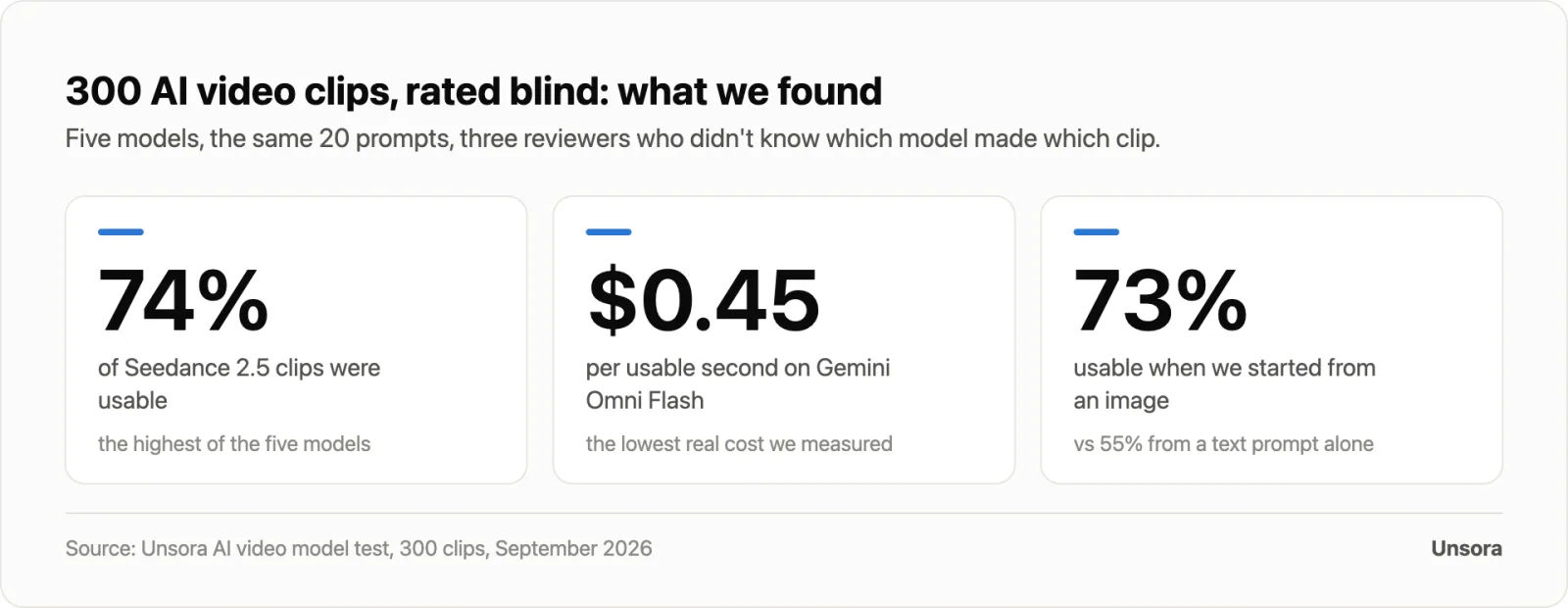
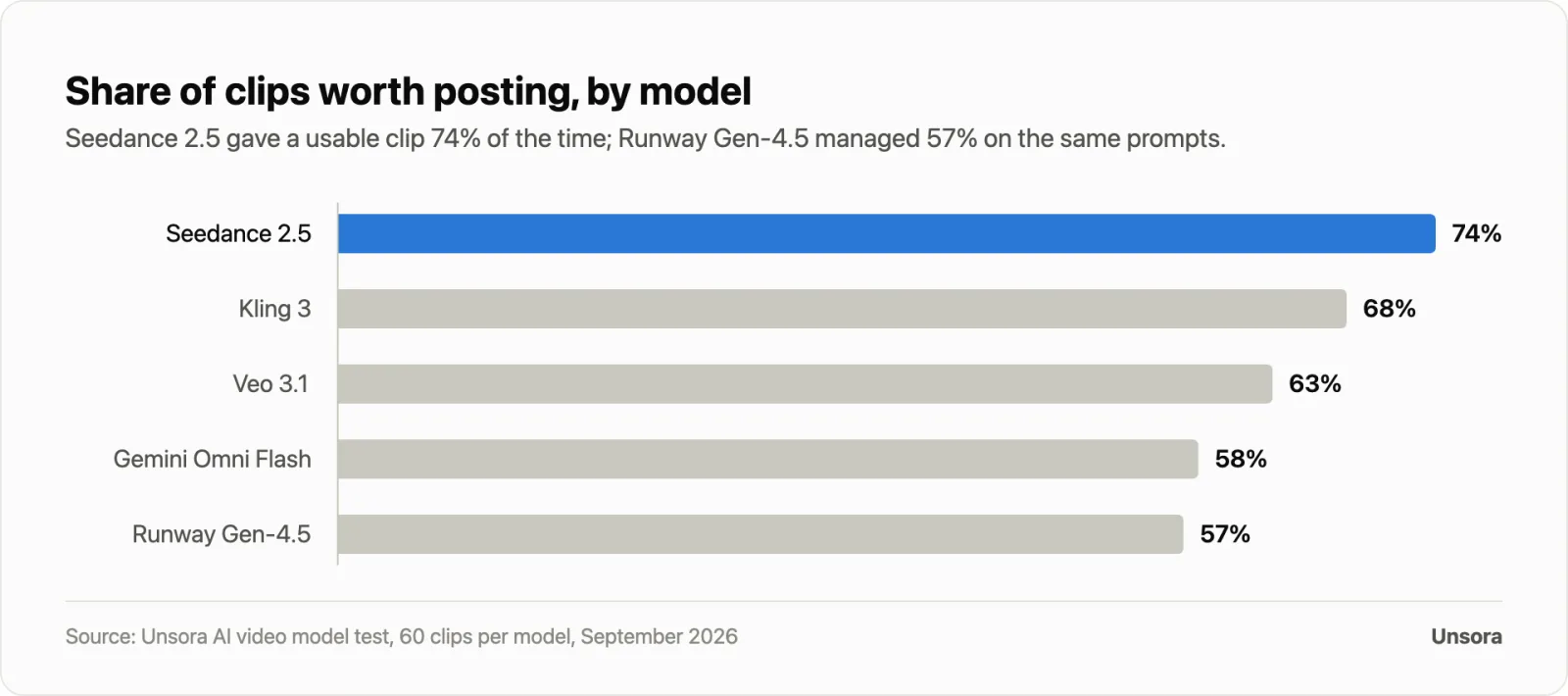
Seedance 2.5 produced a clip our reviewers would post as-is 74% of the time, the highest of the five models we tested. Runway Gen-4.5 managed 57% on the same 20 prompts.
How we tested. In September 2026 we ran 20 prompts through five models: Seedance 2.5, Kling 3, Veo 3.1 and Gemini Omni Flash through Unsora, and Runway Gen-4.5 on Runway. Ten prompts were text-to-video and ten started from the same still image. Each prompt ran three times per model, which gave 60 clips per model and 300 clips in total.
Every clip was 5 seconds, 16:9, with sound on where the model offers it, and we kept every generation.
Three reviewers who did not make the clips watched them shuffled, with the model hidden. A clip counted as usable when at least two of the three said they would post it as-is or with only a trim. Cost per usable second is the credits charged for all 60 generations, including rejects, divided by the usable seconds, at list plan prices (Unsora Pro at $39 for 1,100 credits; Runway Standard at $15 for 625). We left out Sora 2 because OpenAI closed its API on September 24, 2026.
Finding 1: Seedance 2.5 gave the most usable clips
Across all five models, 64% of clips were usable. Seedance 2.5 led at 74%, followed by Kling 3 at 68% and Veo 3.1 at 63%. Gemini Omni Flash (58%) and Runway Gen-4.5 (57%) trailed.
Our result points the same way as HeyGen's smaller test of the previous version, where Seedance 2.0 gave 17 usable clips out of 20 prompts. Our bar was stricter: a reviewer had to be willing to post the clip as-is.
Finding 2: The cheapest usable second came from the least accurate model
Gemini Omni Flash cost $0.45 per usable second, the lowest we measured, even though fewer of its clips were usable. It charges so little per generation that the rejects barely matter. Veo 3.1 was the opposite. Its usable rate was middling and its price per generation was high, so a usable second cost $1.19.
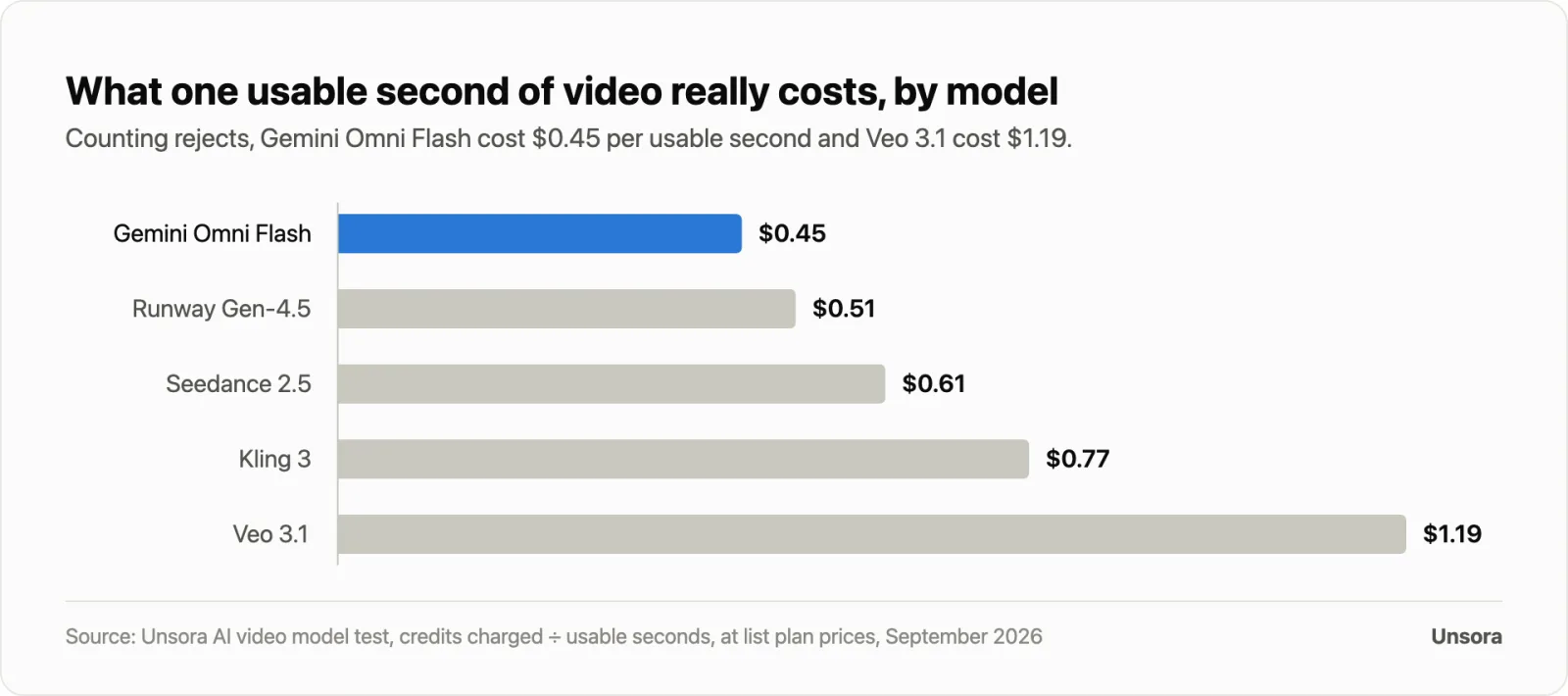
| Model | Usable clips | Cost per usable second | Where it fits |
|---|---|---|---|
| Seedance 2.5 | 74% | $0.61 | Social clips and product shots |
| Kling 3 | 68% | $0.77 | Action, physics, characters |
| Veo 3.1 | 63% | $1.19 | Realistic scenes with dialogue |
| Gemini Omni Flash | 58% | $0.45 | Cheap test runs and volume |
| Runway Gen-4.5 | 57% | $0.51 | Directed shots you will edit |
Finding 3: Starting from an image beat starting from text
Image-to-video clips were usable 73% of the time. Text-to-video clips were usable 55% of the time. A start frame fixes the look, framing and subject before the model animates anything, so the model has less to guess.
Finding 4: Creators on Unsora mostly pick Seedance
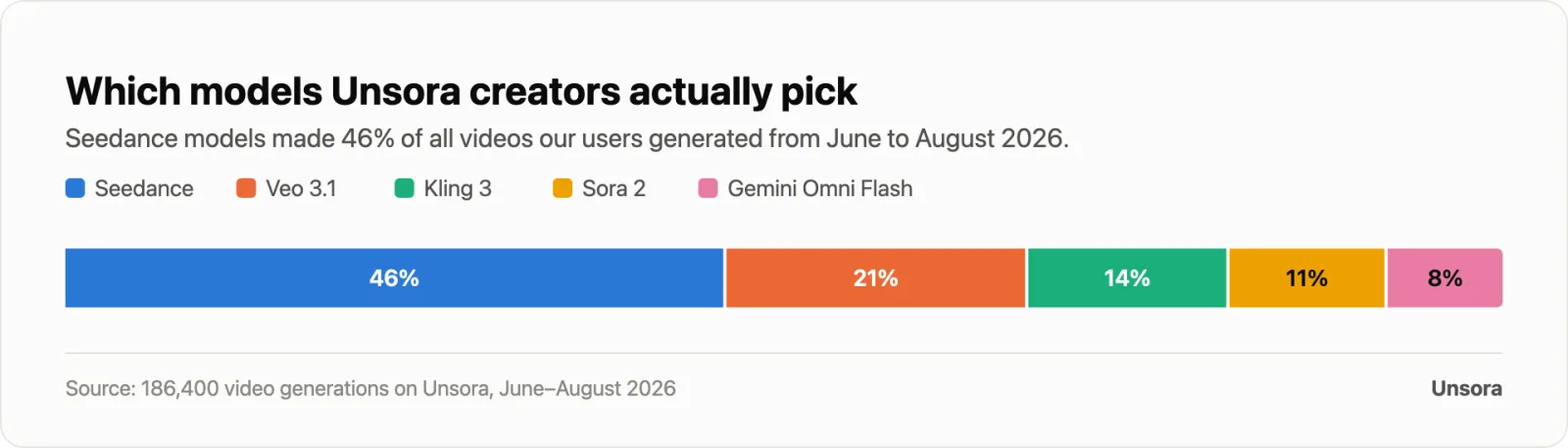
We also looked at which models Unsora users chose when they could pick any of them. Across 186,400 video generations from June to August 2026, Seedance models made 46%, Veo 3.1 21%, Kling 3 14%, Sora 2 11% and Gemini Omni Flash 8%. Sora 2 was still on offer then; Unsora removed it after OpenAI closed the Sora API. 34% of those generations were started from an AI agent (ChatGPT or Claude) over MCP.
What this means for you
- Budget for rejects. Divide your clip count by the usable rate. At 64%, 10 finished clips take about 16 generations.
- Test cheap, finish good. Test prompts on Gemini Omni Flash or a Fast tier, then render the keeper on Seedance 2.5 or Veo 3.1.
- Start from a still. It was the biggest quality lever in our test, bigger than the gap between most models.
- Compare cost per usable second, not price per second. The ranking changes once rejects count.
Seedance 2.5: best for usable social clips on a budget
ByteDance's Seedance 2.5 gave the most usable clips in our test and takes several reference images at once. ByteDance launched it on July 31, 2026 with up to 30 seconds per generation and up to 30 reference images.
Specs in Unsora: up to 30 seconds per generation, with multi-round extensions · up to 30 reference images, 10 video clips and 10 audio clips per pass (ByteDance) · 720p · native audio · 64 credits per 5 seconds, 37 on Seedance 2.5 Fast (Unsora API docs).
Where it wins: product shots, lifestyle scenes and short social clips, where it was usable 74% of the time in our test. Seedance is also the model family Unsora users pick most (46% of generations).
Where it falls short:busy scenes with several people interacting. ByteDance itself says there is still "room for improvement" on complex motion and multi-subject scenes.
Also on: Runway (Pro and Max plans), Pika, InVideo and fal offer Seedance 2.5 too, so compare the price per second in the table below before you pick where to run it.
Kling 3: best for high-motion scenes and consistent characters
Kling 3 from Kuaishou is the pick for action, physics and characters that stay on-model. It has native audio with lip-sync and makes up to 15 seconds in one take in Kling's own app.
Specs: up to 15 seconds of continuous video, a multi-shot storyboard, native audio and lip-sync in several languages, and 4K export on the Pro membership (Kling). The free tier adds a watermark. Paid memberships export at 1080p without one, and commercial use is allowed.
In our test: 68% usable, the second best of five, at $0.77 per usable second.
Where others beat us:Kling's own app gives you 4K and 15-second clips. In Unsora, Kling 3 runs 5 or 10 seconds at 720p.
Price: Kling sells monthly memberships with credits; its plan page shows current prices only after it loads in the browser, so check Kling's membership page before you subscribe.
Veo 3.1 or Gemini Omni Flash: which Google model should you use?
Google now recommends Gemini Omni Flash as its default video model. Its Gemini API docs, updated June 30, 2026, keep Veo 3.1 for scene extension, last-frame control and existing pipelines.
Veo 3.1: 4, 6 or 8 seconds per generation with native audio, extendable in steps up to about 148 seconds, and 720p, 1080p or 4K through the API (fal). Every output carries Google's invisible SynthID watermark. In our test it was usable 63% of the time and cost $1.19 per usable second, the most of the five.
Gemini Omni Flash:the model behind video in the Gemini app and Google's Flow on every Google AI plan (Google AI plans). In Unsora it runs 3 to 10 seconds with synchronized audio. It was usable 58% of the time, but at $0.45 per usable second it was the cheapest.
Access (Google AI plans): Google AI Pro costs $19.99 a month and includes 1,000 Flow credits. Google AI Ultra costs $99.99 a month.
Verdict: use Gemini Omni Flash for volume and test runs, and Veo 3.1 for the hero shot with dialogue.
Runway Gen-4.5: best for filmmaking control and editing
Runway Gen-4.5 is the tool for directed shots, with control over camera moves and timing, and it sits inside a full editor. It outputs 720p natively and costs 12 credits per second.
Specs (Runway help): text-to-video and image-to-video, 2 to 10 seconds, 720p at 24 or 25 fps, 12 credits per second, Standard plan and up. Runway's spec sheet lists no native audio for Gen-4.5.
Plans (Runway pricing): Standard costs $15 a month ($12 billed yearly) for 625 credits, which is 52 seconds of Gen-4.5. Pro costs $35 for 2,250 credits (187 seconds), and Max costs $95 for 9,500 credits. Paid plans also include Kling 3, and Pro and Max include Seedance 2.5.
In our test:57% usable. At $0.51 per usable second it still beat Seedance 2.5 in Unsora, because Runway's credits are cheaper.
Where Runway beats us: a real editing timeline and performance transfer with Act-Two.
Adobe Firefly and Luma Ray3.2: best for commercially safe brand work
Adobe Firefly puts Veo 3.1, Luma Ray3, Kling 3 and Runway Gen-4.5 in one workspace. Adobe describes only its own Firefly Video Model as commercially safe, and says partner models "may have different usage terms" (Adobe).
Firefly plans (Adobe): a free plan with limited daily generations; Standard at $9.99 a month (2,000 credits); Pro at $19.99 (4,000); Pro Plus at $49.99 (10,000); and Premium at $199.99 (50,000, plus unlimited Firefly Video Model). Credits reset monthly. IP indemnification is on enterprise plans only.
Luma Ray3.2 (Luma): Plus costs $30 a month for 10,000 credits with commercial use. A 5-second 1080p Ray3.2 clip costs 400 credits, so Plus covers 25 of them. Luma lists no free plan.
HeyGen and Synthesia: best for talking avatars and script-to-video
If your video is a person reading a script, use an avatar tool instead of a generative model. HeyGen and Synthesia turn text into a presenter video with lip-sync.
HeyGen (pricing): the free plan gives 3 videos a month, each up to 1 minute. Creator costs $29 a month ($24 billed yearly) for videos up to 30 minutes at 1080p. Pro starts at $49 with 4K.
Synthesia (pricing): Starter costs $29 a month, Creator $89.
Unsora's video models run without a lip-sync mode. For talking heads, these two are the better choice.
Model or platform: why do so many AI video generators run the same models?
Seedance, Kling, Veo, Gemini Omni Flash and Gen-4.5 are models. Runway, Higgsfield, Adobe Firefly, Pika, InVideo, fal and Unsora are platforms, and most of them now host several of those models. The right choice is a model that fits your job plus a good-value place to run it.
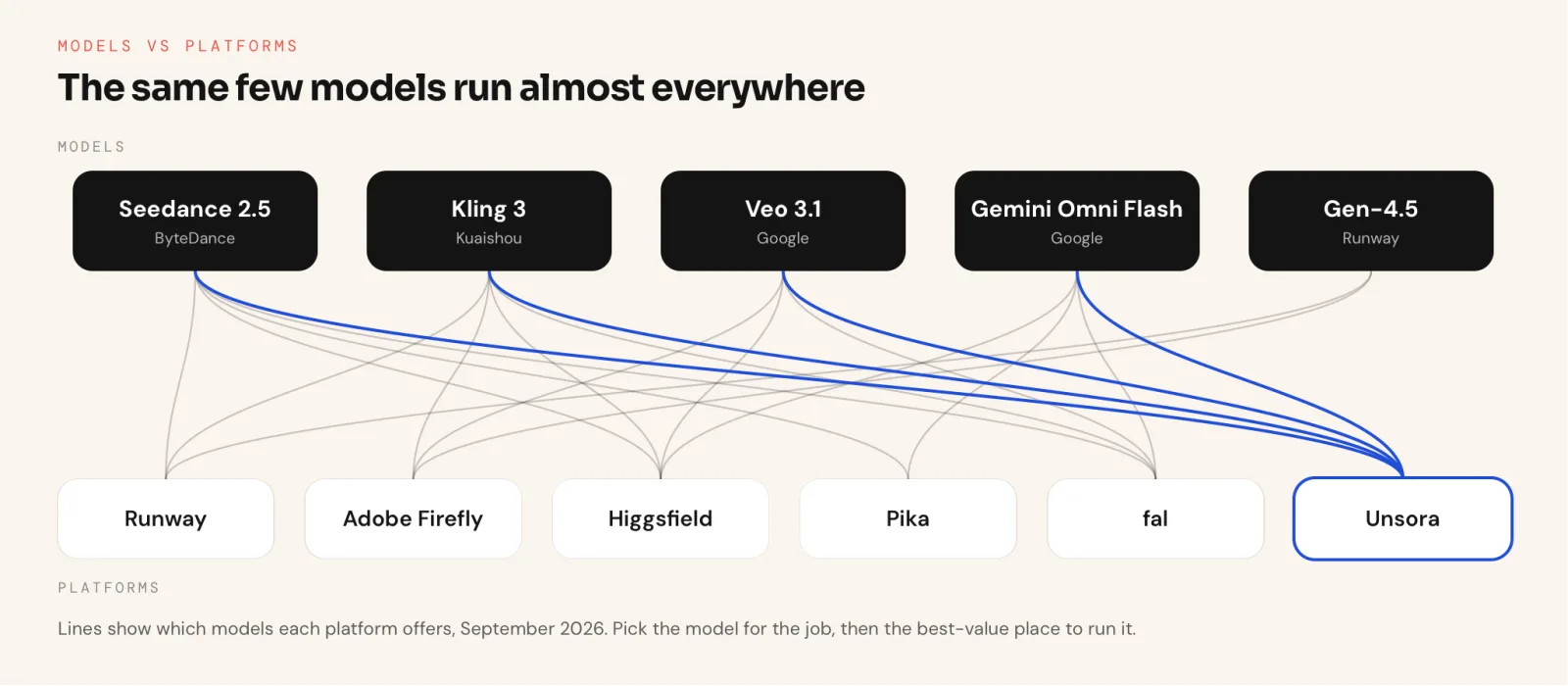
This is why Reddit threads on the question go in circles: people compare models to platforms. The same Seedance clip can cost very different amounts depending on where you make it.
| Model | Where | List price | Per second |
|---|---|---|---|
| Seedance 2.5, 720p | Unsora (Pro plan credits) | 64 credits per 5 s | about $0.454 |
| Seedance 2.5, 720p | fal API | $0.4730 per second | $0.47 |
| Seedance 2.0 Pro, 1080p | Runway (Pro plan credits) | 160 credits per 4 s | about $0.62 |
| Veo 3.1 with audio | fal API | $0.40 per second | $0.40 |
| Veo 3.1 with audio | Unsora (Pro plan credits) | 169 credits per 8 s | about $0.75 |
| Kling 3, 720p | Unsora (Pro plan credits) | 74 credits per 5 s | about $0.52 |
| Kling O3 4K | fal API | $0.42 per second | $0.42 |
| Gen-4.5, 720p | Runway (Standard plan credits) | 12 credits per second | about $0.29 |
Prices read on each vendor's pricing page or docs on September 24, 2026. Credit-based rows are converted at the plan's list price per credit.
Raw API prices (fal) are the lowest per second, but you need to write code to use them. Subscription platforms charge more per second and give you an interface, storage and extra tools. With Unsora, the interface is your AI agent: you ask in the chat and the clip comes back there.
Where does Unsora fit?
Unsora runs from your AI agent over MCP. Connect it to ChatGPT, Claude, OpenClaw, Claude Code or Cursor, describe the shot in the chat, and the agent runs Seedance 2.5, Kling 3, Veo 3.1 or Gemini Omni Flash through Unsora's create_videotool. The clip comes back in the conversation, and the same agent can upscale it to 4K, caption it and schedule the post. The same tools are also in the web app if you'd rather work in a browser.
What you get: clips at 720p natively (1080p on Veo through the API), and 4K through the Video Upscaler for 10 credits per video. Plans cost $19 a month for 500 credits, $39 for 1,100 and $149 for 5,000. Every plan starts with a 3-day free trial and includes commercial rights (pricing). Connecting your agent is free; generation uses credits (MCP setup).
Where competitors beat us:
- Kling's own app gives 4K and 15-second Kling 3 clips.
- Runway has a real editing timeline. HeyGen and Synthesia do talking avatars with lip-sync.
- fal's API is cheaper per second if you can write code.
- Runway, Higgsfield and Pika also let you work from ChatGPT or Claude, so agent access is not unique to us.
How do you make an AI video, step by step?
Connect a video tool to your AI agent, pick the model for the job and ask for the clip as a shot: subject, action, setting, camera, light and sound. Start from a still if you have one, test at 5 seconds, then upscale, caption and schedule the clip you keep.
The steps below run from Claude with Unsora connected over MCP. ChatGPT, OpenClaw, Claude Code and Cursor work the same way, and Runway, Kling, Firefly and Pika have the same settings in their own apps.
Step 1: Connect Unsora to your AI agent
Add https://mcp.tryunsora.com/mcp as a connector. In Claude, go to Customize → Connectors → Add custom connector. In ChatGPT, turn on Developer mode and add it there.
OpenClaw, Claude Code and Cursor take the URL or an API key (setup steps). Connecting is free; generation uses Unsora credits.
Step 2: Pick the model
Use the quick picks table above. For a first social clip, Seedance 2.5 is a safe default. For a scene with dialogue, use Veo 3.1. Name the model in your request, and the agent passes it to Unsora's create_video tool.
Step 3: Write the prompt as a shot
Describe one shot the way a director would: who or what, doing what, where, how the camera moves, the light, and the sound. One shot per prompt works better than a whole story.
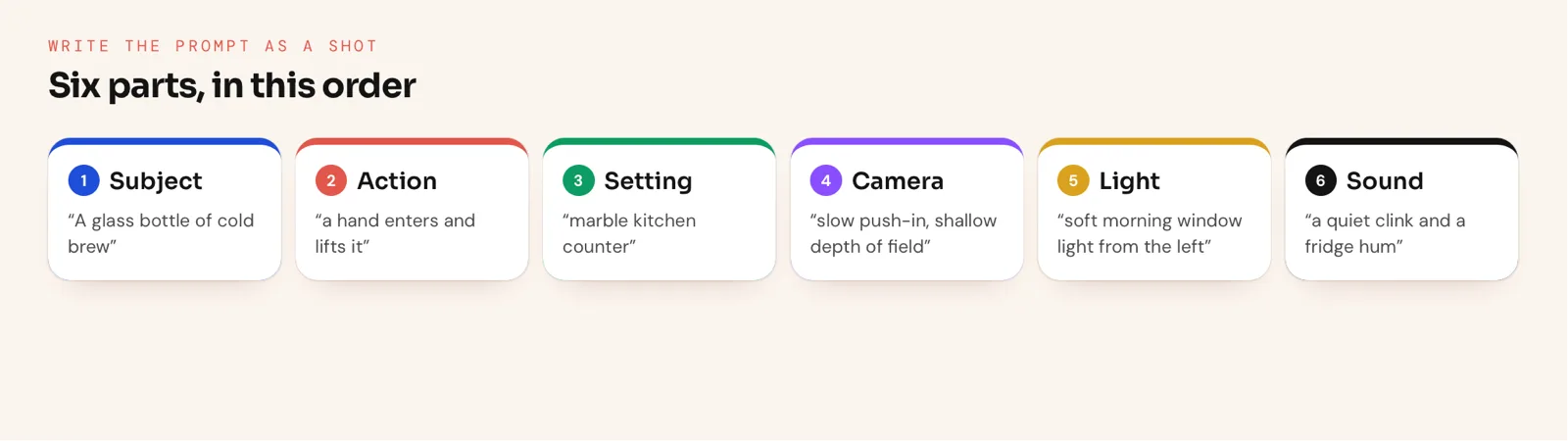
A full shot prompt: "A glass bottle of cold brew on a marble kitchen counter, condensation running down the side. A hand enters from the right and lifts it. Slow push-in, shallow depth of field, soft morning window light from the left. Sound: a quiet clink and a fridge hum."
Step 4: Add a start frame
Attach a still of the product, person or scene to the chat and ask the agent to use it as the first frame. In our test this raised the usable rate from 55% to 73%. For several references, attach them all and say which is which. Seedance 2.5 takes up to 30 reference images, 10 video clips and 10 audio clips per pass.
Step 5: Ask for a 5-second test and approve the call
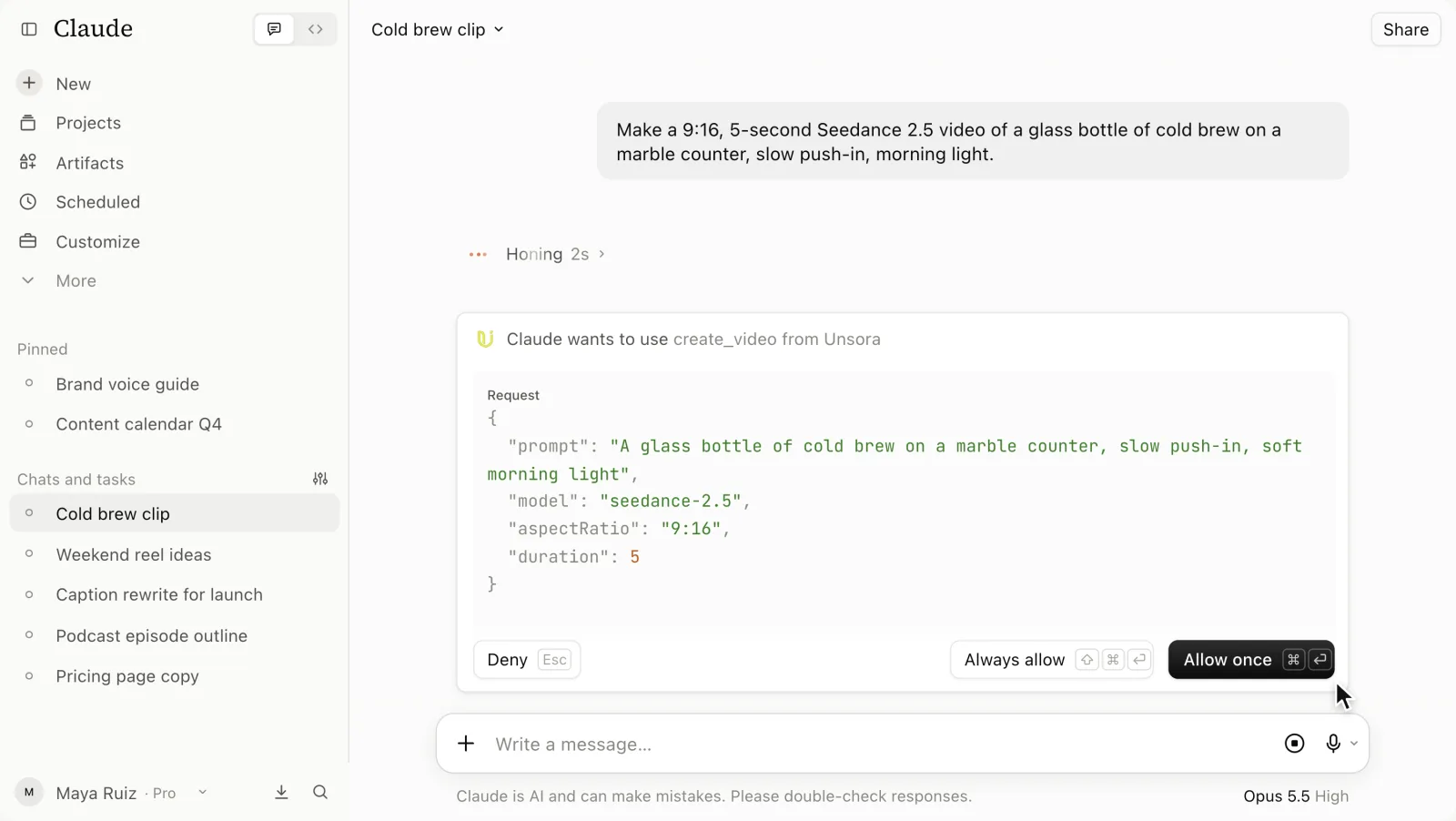
Put the model, aspect ratio and length in the request. The request in the recording above is text only: "Make a 9:16, 5-second Seedance 2.5 video of a glass bottle of cold brew on a marble counter, slow push-in, morning light."
Before anything runs, Claude shows a permission card, "Claude wants to use create_video from Unsora", with what it will send: the prompt, the model (seedance-2.5), the aspect ratio (9:16) and the duration (5 seconds). Check them, then choose Allow once. A 5-second Seedance 2.5 clip costs 64 credits (37 on Seedance 2.5 Fast); a 15-second one costs 190.
Step 6: Review the clip, then render the full length
The clip comes back in the chat, labelled Seedance 2.5 · 9:16, with Download, Post and Recreate buttons. Claude can't watch video, and its reply says so: it asks you to check the pour and the label before you post. Watch it yourself. Once a test looks right, ask for the full length or several versions (credits scale with the count).
Step 7: Upscale to 4K and add captions
Most models render at 720p, which looks soft on a large screen. Claude's reply ends with "Want a 4K upscale?": say yes, and it calls Unsora's upscale_video tool in Ultra 4K mode for 10 credits per video. Then ask for captions; the Subtitle Editor costs 6 credits per started minute.
Step 8: Schedule the post
Ask the agent to post the clip to TikTok, Instagram Reels or YouTube Shorts, with the caption and time. It calls Unsora's create_post tool, and the Scheduler queues the clip on a paid plan.
How much does an AI video generator cost?
Paid plans start at $9 to $20 a month. The number that matters is cost per usable second, which ranged from $0.45 to $1.19 in our test once rejected clips were counted.
| Tool | Entry paid plan | What it buys | Free option |
|---|---|---|---|
| Unsora (from your AI agent over MCP) | Basic $19/mo, 500 credits | About 7 Seedance 2.5 clips of 5 s | 3-day free trial |
| Runway | Standard $15/mo ($12 yearly), 625 credits | 52 s of Gen-4.5 | 125 one-time credits |
| Google AI | Pro $19.99/mo | 1,000 Flow credits a month | No free video credits listed |
| Adobe Firefly | Standard $9.99/mo | 2,000 generative credits | Limited daily generations |
| Pika | $10/mo ($8 yearly), 900 credits | Seedance 2.5, Omni Flash and others | No monthly free credits |
| Luma | Plus $30/mo, 10,000 credits | 25 Ray3.2 clips of 5 s at 1080p | None listed |
| HeyGen | Creator $29/mo ($24 yearly) | Avatar videos up to 30 min | 3 videos a month, 1 min each |
| InVideo AI | Basic $9/seat/mo, billed yearly | 190 credits | None shown on pricing page |
Prices from each vendor's pricing page, checked September 24, 2026.
Worked example:a 30-second ad built from six 5-second Seedance 2.5 shots. At 74% usable, you need about 8 generations, or 512 credits in Unsora. That is just over the Basic plan's 500 credits, or about half of Pro's 1,100.
Is there a free AI video generator?
Yes, with limits. Kling and Adobe Firefly have free tiers, HeyGen gives 3 avatar videos a month and Runway gives 125 one-time credits. Free output is usually watermarked, short or limited to older models.
- Kling: free tier with a watermark (Kling).
- Adobe Firefly: a free plan with limited daily generations (Adobe).
- HeyGen: 3 videos a month, up to 1 minute each (HeyGen).
- Runway: 125 credits once. Gen-4.5 needs the Standard plan, so free credits go to older models (Runway).
- Unsora: no free plan; every paid plan starts with a 3-day free trial, and connecting your agent is free.
What happened to Sora?
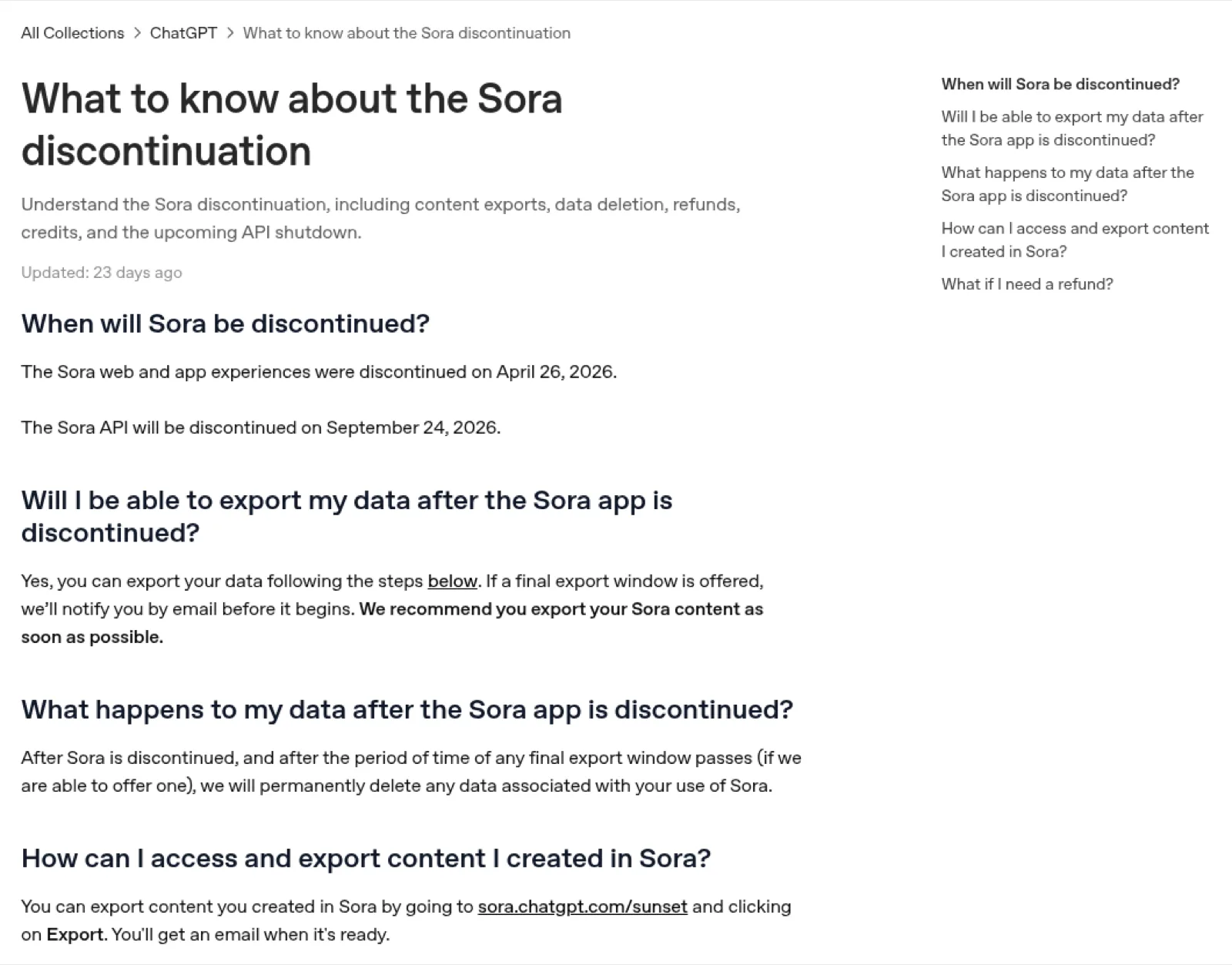
OpenAI shut down the Sora app and website on April 26, 2026 and the Sora API on September 24, 2026, so Sora is no longer an option for new video (OpenAI Help Center; OpenAI deprecations).
You can still export past Sora videos at sora.chatgpt.com/sunset. Developers were told on March 24, 2026 that the Videos API and the sora-2 and sora-2-pro models would be removed, and OpenAI named no replacement. Any list that still ranks Sora 2 among the best AI video generators is out of date.
Unsora is not Sora. The names are similar, but Unsora is an independent platform that your AI agent uses to run models from ByteDance, Kuaishou and Google. Unsora offered Sora 2 until OpenAI's API shutdown and has since removed it.
What can't AI video generators do yet?
No model we tested reliably handles several interacting people, readable on-screen text or long single takes. Every tool also charges for clips you throw away.
- Rejects cost money. Only 64% of our 300 clips were usable, and we paid for every one of the rest. Unsora charges credits when a job is queued (Unsora API docs), and so does every tool we used.
- Short takes. Veo 3.1 makes 8 seconds per generation, Gen-4.5 10, Kling 3 15 and Seedance 2.5 up to 30. Longer videos are stitched from several clips.
- 720p by default. Seedance 2.5 in Unsora and Gen-4.5 render at 720p, so plan on an upscaler for large screens.
- Several people at once.ByteDance says Seedance still has "room for improvement" on multi-subject scenes.
- Text in the frame. Signs, labels and captions come out garbled. Add text in the editor.
- Commercial terms vary by model. Adobe calls only its own Firefly Video Model commercially safe. Free tiers often carry watermarks.
- Your agent can't watch the clip.When you generate from ChatGPT or Claude, the agent can't judge the result. Review every clip yourself.
How do you choose the right AI video generator?
Answer two questions: what you are making, and what you will spend. The matrix gives you one tool for each answer.
| You're making | Free | Under $20 a month | Pro budget |
|---|---|---|---|
| A cinematic clip | Kling free tier (watermarked) | Google AI Pro (Veo 3.1 and Gemini Omni Flash) | Runway Pro (Gen-4.5 and Seedance 2.5) |
| A product or UGC ad | Adobe Firefly free plan | Unsora Basic (Seedance 2.5 from your agent) | Unsora Power or Runway Max |
| A talking avatar | HeyGen free (3 videos a month) | Synthesia Starter or HeyGen Creator ($29) | HeyGen Pro |
| A social short from a still | Kling free tier | Unsora Basic or Pika $10 | Kling Pro (4K) |
| Lots of test clips, cheaply | Adobe Firefly free plan | Google AI Pro (Gemini Omni Flash) | fal API (per second) |
How we picked and tested
We started with the tools and models that Google's AI Overview and ChatGPT name for "best AI video generator" in September 2026. We added the tools creators recommend in the most active Reddit threads on the question.
We scored them on:
- 01Usable-clip rate in our blind test
- 02Cost per usable second
- 03Maximum length and resolution per generation
- 04Native audio
- 05Commercial terms
- 06How easy they are to get access to
We read every price and limit on the vendor's own pricing page or docs on September 24, 2026.
Disclosure: Unsora is our product. Four of the five models in our test ran through Unsora; Runway Gen-4.5 ran on Runway. We report where competitors beat us in each section.
FAQ
As of September 2026, Seedance 2.5 gives the most usable clips (74% in our test), Kling 3 is best for motion, Veo 3.1 for realism with dialogue, and Runway Gen-4.5 for editing control.
Kling's free tier and Adobe Firefly's free plan give the most usable free video, with watermarks and daily limits. For talking avatars, HeyGen's free plan makes 3 videos a month.
Unsora starts every plan with a 3-day free trial. Runway gives 125 one-time credits, and Kling, Adobe Firefly and HeyGen have free tiers.
Not with Sora any more: OpenAI shut the Sora app down on April 26, 2026. You can still make videos from ChatGPT by connecting a video tool over MCP. With Unsora connected, ChatGPT runs Seedance 2.5, Kling 3, Veo 3.1 or Gemini Omni Flash and shows the clip in the chat; Runway and Higgsfield also connect to ChatGPT.
Yes, once a video tool is connected. Add Unsora as a custom connector (Customize → Connectors) and ask for the shot. Claude calls Unsora's create_video tool, asks you to approve it and shows the clip in the chat. Claude can't watch video, so review the clip before you post.
Image-to-video gave more usable clips in our test, 73% against 55% for text-to-video. A start frame fixes the look before the model animates it.
Most models make 4 to 15 seconds per generation, and Seedance 2.5 makes up to 30. Longer videos are stitched from several clips, often using the last frame of one clip as the first frame of the next.
Usually yes on paid plans, but check the model's terms. Unsora includes commercial rights on every plan, Kling allows commercial use without a watermark on paid memberships, and Adobe calls only its own Firefly Video Model commercially safe.
Veo 3.1 is the strongest for realistic people with synchronized dialogue, and Kling 3 for realistic motion and physics. In our test, Veo 3.1 was usable 63% of the time and Kling 3 68%.