


ChatGPT
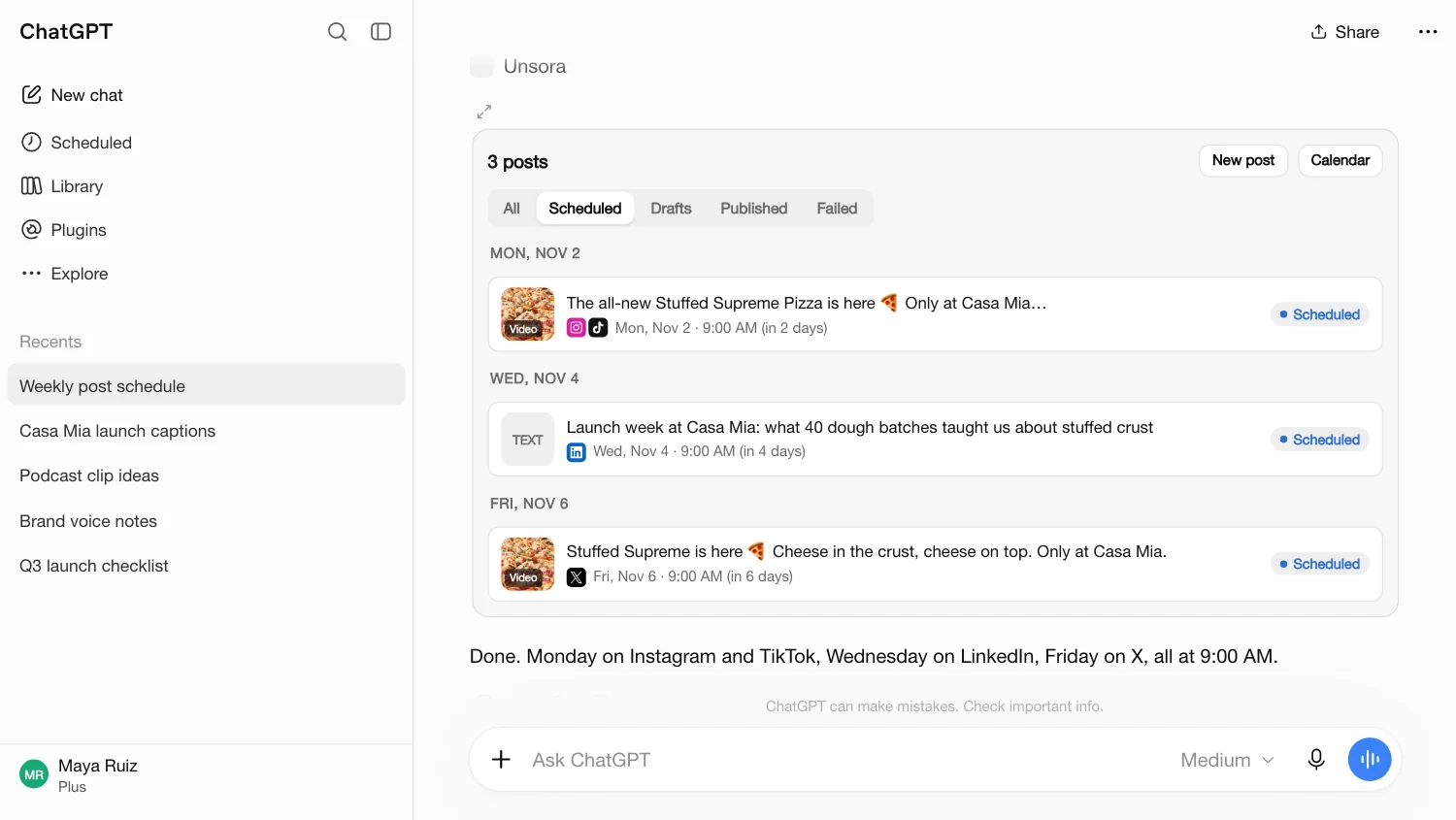
Add Unsora as a connector (paid ChatGPT plans), then ask the way you'd ask a social media manager: “Post this to Instagram and LinkedIn on Friday at 9am.” ChatGPT writes each caption and Unsora queues the posts.
Unsora is a social media scheduler for AI agents. Connect ChatGPT, Claude, Claude Code, OpenClaw or Hermes, and your agent posts and schedules to TikTok, Instagram, YouTube, Facebook, Bluesky, LinkedIn, X and Pinterest, with a caption written for each. Need the video too? Content Studio makes it, in the chat or the web app.
Plans from $19/month · Cancel any time
 ChatGPT
 ClaudeClaude Code
 Cursor
 OpenClaw
 Hermes
 Gemini CLIany MCP client
The old way
Ask any AI agent for a week of posts and you'll get good drafts. Then the work starts:
Five logins, the same video uploaded three times, and a caption rewritten for every platform, starting from posts_week.txt.
ChatGPTWrites the week's postsposts_week.txt Your agent should post them too. That's why we built Unsora.
One URL, about a minute
Paste one URL into ChatGPT, Claude or your agent's config. No install.
Add Unsora as a connector (paid ChatGPT plans), then ask the way you'd ask a social media manager: “Post this to Instagram and LinkedIn on Friday at 9am.” ChatGPT writes each caption and Unsora queues the posts.
Paste one URL into Customize → Connectors → + Add → Add custom connector and sign in. Claude drafts the week with a caption for each platform and schedules it, in one thread. Works on Claude's free plan.
Set up Claude in a minute →One command in the terminal. Point your agent at a folder of videos and it writes the captions and queues them across TikTok, YouTube and Instagram for the week.
Text your agent from Telegram: “Post the new drop video to TikTok and Instagram on Friday.” It calls Unsora whenever a job needs a post, or the video for one.
The scheduler
Your agent already writes the posts. Unsora publishes and schedules them, keeps the queue, and tells you how they did.
Tell your agent what to post. It writes a version for each platform and sends one post to up to 10 accounts.
A post stays a draft unless you give it a time or ask to publish, so you review every post before it goes out.
Ask “what's scheduled this week?”, then edit, reschedule, retry or pull any post without opening another app.
Ask how a post did and your agent reads its analytics and answers, next to the next post it's planning.
TikTok privacy and AI labels, YouTube titles and visibility, Pinterest boards and links, X's 280 characters. Set them in plain words.
Whichever agent scheduled it, every post lands in the Unsora calendar, and anything a platform would reject comes back with the reason first.
Platforms
Your agent posts to TikTok, Instagram, YouTube, Facebook, Bluesky, LinkedIn, X and Pinterest, with more platforms added all the time.
Coming soon: Threads, Mastodon.
A week in one message
Your agent runs it in order: check the accounts, schedule each post, read back the queue, report last week's results. Your part is the instruction and the review.
> Here are this week's 5 videos. Write a caption for each platform and schedule one a day across TikTok, Instagram, LinkedIn and X at 9am starting Monday, then tell me how last week's posts did.
Accounts
get_accounts
TikTok, Instagram, LinkedIn, X
Schedule
create_post
Mon to Fri, 9:00, a caption per platform
Queue
list_posts
Everything that's scheduled
Results
get_post_analytics
How last week's posts did
Content Studio
When a post needs media, your agent can make it, then schedule it. Every tool works in the chat or the web app, on the same plan and the same credits.
 Seedance 2.5
 Kling 3
 Veo 3.1Gemini Omni FlashNano BananaGPT Image
Text or images to video with Seedance 2.5, Kling 3, Veo 3.1 and Gemini Omni Flash. Switch models per job.
Images from a sentence with Nano Banana, Seedream and GPT Image.
One long video in, up to 20 captioned clips out, reframed with the speaker centred, or just the moments you describe.
35 caption styles, caption translation, and burned-in subtitles removed.
Your face, a thumbnail you like and the script or link: a thumbnail in that style.
One recurring AI presenter who looks the same in every video. Write the lines and your agent puts them on camera.
Upscale images to 8K and video from 1080p to 4K, or animate a still with Motion Control.
Characters, sets and props that keep one look across a series.
A music bed for the video, or a voiced script.
Every plan includes scheduling to every live platform and MCP access for every agent. Plans include no credits: Content Studio jobs (video, images, clips and upscales) run on credit packs you buy when you need them.
For a creator posting one brand
$19/month
5 accounts, billed monthly
Start 7-day free trial$0.00 due today, cancel anytime
For one person marketing a business
$39/month
15 accounts, billed monthly
Start 7-day free trial$0.00 due today, cancel anytime
For agencies and teams running many brands
$99/month
50 accounts, billed monthly
Start 7-day free trial$0.00 due today, cancel anytime
Content Studio credits from $20 for 500. Packs never expire.
Unsora is a social media scheduler for AI agents. Connect it to ChatGPT, Claude, Claude Code, Cursor, OpenClaw or Hermes and your agent posts and schedules to TikTok, Instagram, YouTube, Facebook, Bluesky, LinkedIn, X and Pinterest, with a caption written for each platform. Content Studio, paid for with credit packs, can also make the video or image for a post.
Not on its own: ChatGPT writes the post, then you'd copy it into each app. With Unsora connected (paid ChatGPT plans), ChatGPT can publish or schedule the post to TikTok, Instagram, YouTube, Facebook, Bluesky, LinkedIn, X and Pinterest from the same chat.
Yes, once Unsora is added as a custom connector. Ask Claude to post or schedule and it calls Unsora, which publishes to the accounts you connected. It works on Claude's free plan and in Claude Code.
In Claude, go to Customize → Connectors → + Add → Add custom connector, paste https://mcp.tryunsora.com/mcp and sign in. In ChatGPT (paid plans), turn on Developer mode under Settings → Connectors, create a connector and paste the same URL. Full steps for every agent are on the connector page.
ChatGPT (paid plans), Claude on web, desktop and mobile (free plan included), Claude Code, Cursor, OpenClaw, Hermes, Gemini CLI, and any agent that connects to remote MCP servers over Streamable HTTP.
TikTok, Instagram, YouTube, Facebook, Bluesky, LinkedIn, X and Pinterest. Instagram needs a professional account. You can also queue posts yourself in the scheduler: post once, publish everywhere.
No. A post is saved as a draft unless you ask your agent to publish it or give it a time, and you can edit, retry or pull any post from the queue.
$19 a month for 5 social accounts, $39 for 15, or $99 for 50. Every plan includes scheduling to every live platform and MCP access for every agent, with a 7-day free trial. Content Studio (video, images, clips) runs on credit packs you buy when you need them, from $20 for 500 credits.
Unsora is a paid service with a 7-day free trial on every plan. The free tools (downloaders, converters, resizers) need no account and cost nothing.
Yes. Content Studio lets your agent generate video with Seedance 2.5, Kling 3, Veo 3.1 and Gemini Omni Flash, clip long videos into captioned shorts, make thumbnails and upscale to 4K, then schedule the result.
No. They're separate products from separate companies. Sora is OpenAI's video model, and OpenAI shut down the Sora API in September 2026. Unsora is an independent social media scheduler for AI agents.
Unsora only asks for the access it needs to publish, like uploading videos and reading your channel info. It never posts without your action, and never sells or reuses that data.
Yes. Everything your agent can do also works in the Unsora web app, including the calendar of every scheduled post.
No. Connecting an agent is a settings change. There's a REST API for developers who want one, with the developer docs to match.
Yes. Unsora's code is on GitHub under the AGPL-3.0 license.
Unsora is a social media scheduler for AI agents. Connected to ChatGPT, Claude, Claude Code, Cursor, OpenClaw or Hermes, it lets your agent post and schedule to TikTok, Instagram, YouTube, Facebook, Bluesky, LinkedIn, X and Pinterest, with a caption written for each platform, and report how each post did. Its Content Studio can also make the video or image for a post, clip long videos into captioned shorts and upscale to 4K. More about Unsora →
Last updated: 27 October 2026
One URL, about a minute to connect.
Connect your AI agentConnects in under a minute · 7-day free trial · Nothing posts until you say so