


Unsora/Post to Pinterest from ChatGPT
Post to Pinterest from ChatGPT: Step-by-Step Setup
By Irfan Sadek, co-founder of Unsora · Last updated:
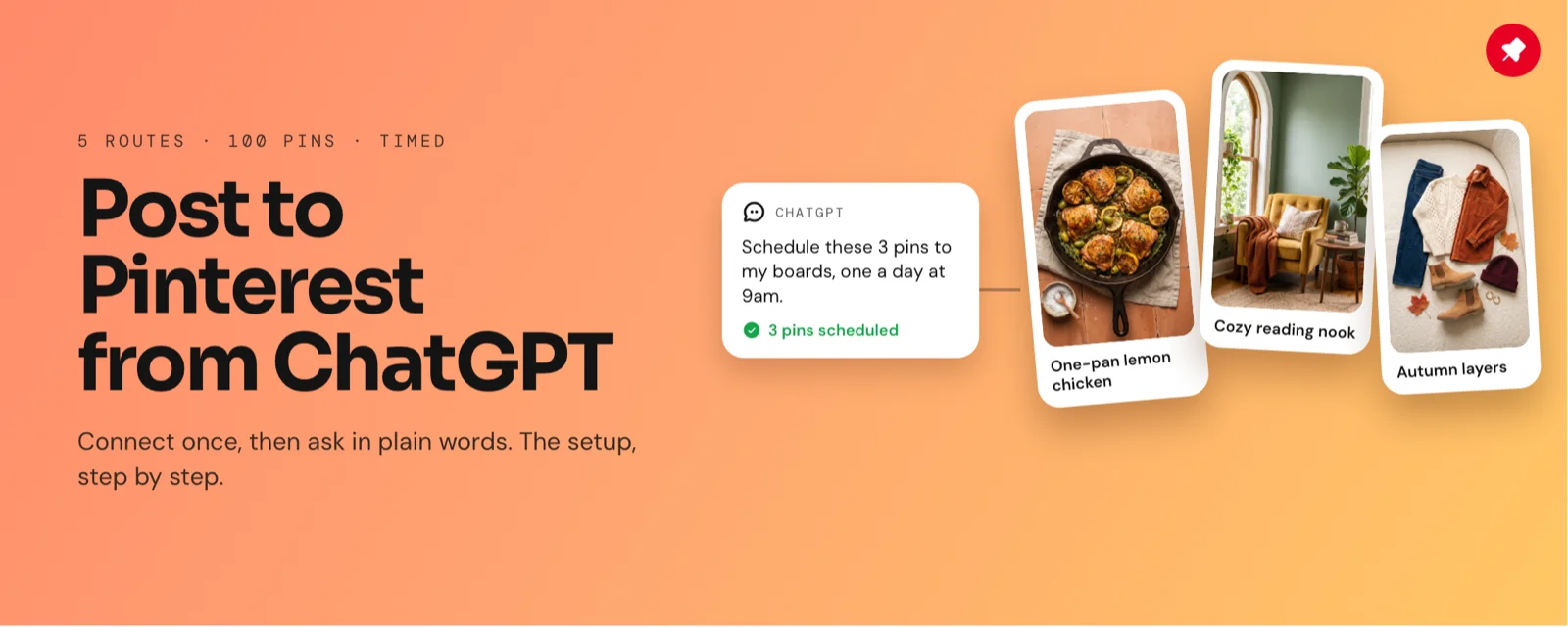
ChatGPT can't publish to Pinterest on its own. To post to Pinterest from ChatGPT, add a connector like Unsora or the Tailwind app, authorize Pinterest once, then ask in plain language. In our test, 20 pins went out in 22 minutes, setup included.
Key takeaways
- Publishing a pin from ChatGPT takes a connector you authorize. Without one, ChatGPT writes the pin and leaves the upload to you.
- We timed every option on the same 100 pins. The Unsora connector finished 20 pins in 22 minutes including setup; by hand took 58 minutes.
- Choose by fit: Tailwind if Pinterest is your only channel, Make for hundreds of pins off a spreadsheet, Unsora if one ChatGPT chat should cover Pinterest and your other platforms, by hand for a few pins a month.
ChatGPT writes the pin in seconds, then leaves you at "download this and upload it." Across 20 pins, that's an hour of tab switching. Below are five routes that publish, each timed on the same pins. Unsora is ours, and it got the same test.
Can ChatGPT post to Pinterest on its own?
No. Out of the box, ChatGPT writes the pin and you publish it; only a connector you have authorized lets it push a pin live.
That connector (ChatGPT calls these apps or plugins) holds access to your Pinterest account and creates, schedules or publishes pins on request. ChatGPT may ask you to confirm before anything is written (OpenAI Help).
We asked three ways on October 27, 2026, and got the same answer each time: ChatGPT can't publish without an authorized connection. One r/ChatGPT user asked for exactly this, a Pinterest connection that works "with permission".
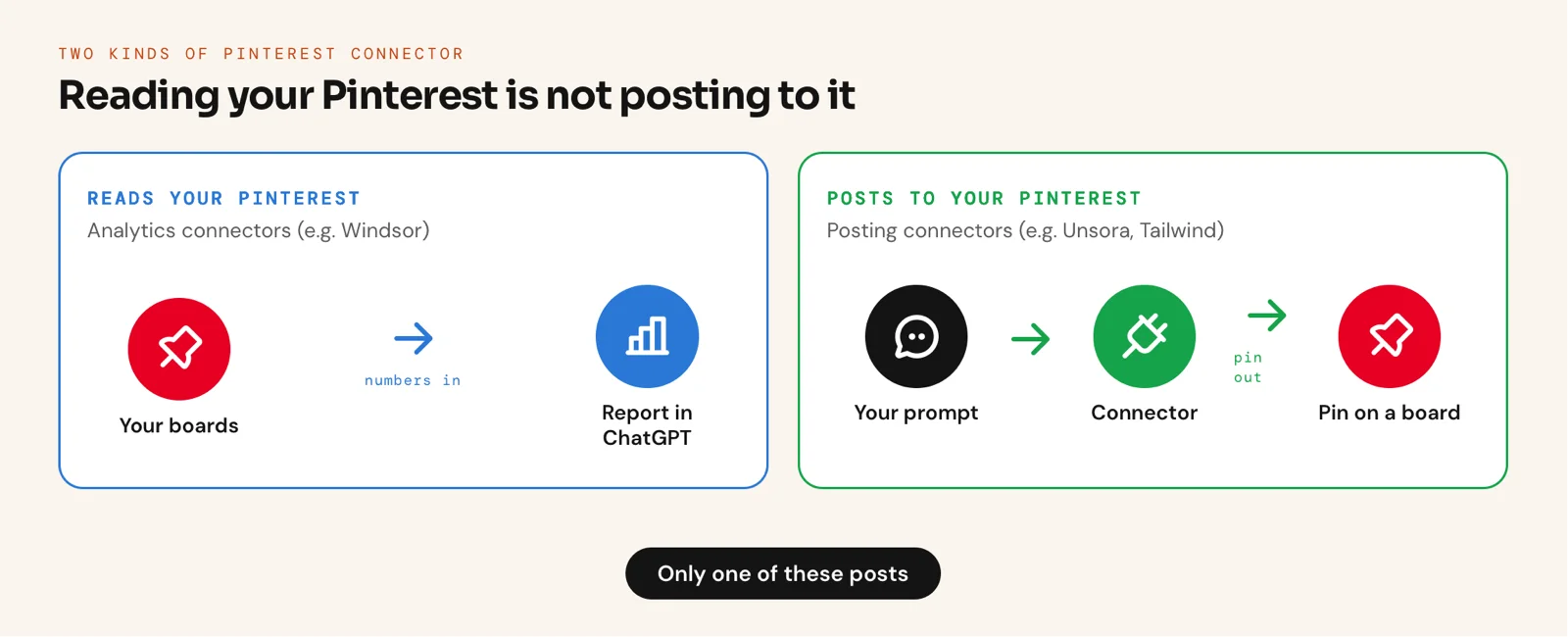
Posting connectors aren't the only kind. Windsor's, a common suggestion, feeds your Pinterest stats into ChatGPT for reporting (Windsor's setup video); it doesn't create pins.
What are the ways to post to Pinterest from ChatGPT?
Five options work, and the choice is setup time against minutes per pin.
Match the route to the job. Prices checked October 27, 2026; timings from our test of 100 pins.
| Route | Setup | Minutes per pin | Cost | Best for | Trade-off |
|---|---|---|---|---|---|
| By hand | None | 2.9 minutes | Free | A few pins a month | Three tabs plus a download per pin |
| Pinterest's scheduler | None | 3.4 minutes | Free with a business account | A small queue without extra tools | One pin at a time, 10 scheduled at most, 30 days out |
| Make scenario | 48 minutes | 0.4 minutes | Free plan with 1,000 credits a month | Hundreds of pins off a spreadsheet | Takes time to build; a changed field breaks it |
| Tailwind app in ChatGPT | 9 minutes | 1.3 minutes | Free to start; Pin Scheduling from $17.99/mo billed yearly | Pinterest as your main channel | Pinterest alone; each account needs its own plan |
| MCP connector (Unsora) | 4 minutes | 0.9 minutes | Unsora from $19/mo (3-day trial) plus ChatGPT Plus or above | One chat covering Pinterest and other platforms | Two subscriptions; first board unless you name one |
Sources: Pinterest Business help, Make pricing, Tailwind pricing. PinBridge and Breakreach also post pins as MCP connectors.
How long does each route take? We timed 100 pins
Via the Unsora connector, 20 pins went live in 22 minutes, setup included, against 58 minutes by hand. Per pin, Make was quickest after its 48-minute build.
How we tested.Between October 19–23, 2026, one tester pushed the same 20 finished pins (2:3 images, titles and descriptions written in ChatGPT) to one Pinterest business account via every route, 100 pins in total, in random order. Setup was timed once, then we logged the median hands-on minutes per pin until each was live or scheduled. A pin "needed a fix" if it landed on the wrong board, carried the wrong text or never published.
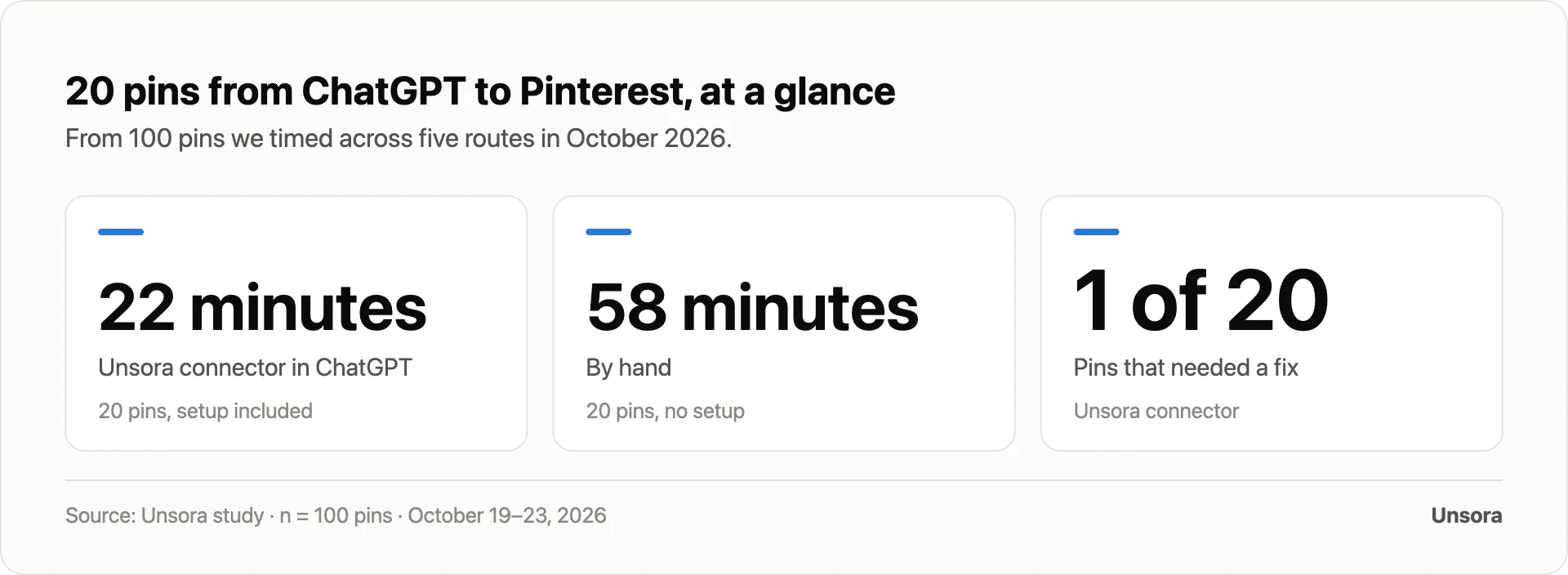
- With the Unsora connector, 20 pins took 22 minutes: 4 minutes to set up, then 0.9 minutes per pin.
- 1 of 20 Unsora pins needed a fix: with no board named, it defaulted to the first one. On Make, 2 of 20 needed a fix after a sheet column was mapped to the wrong field.
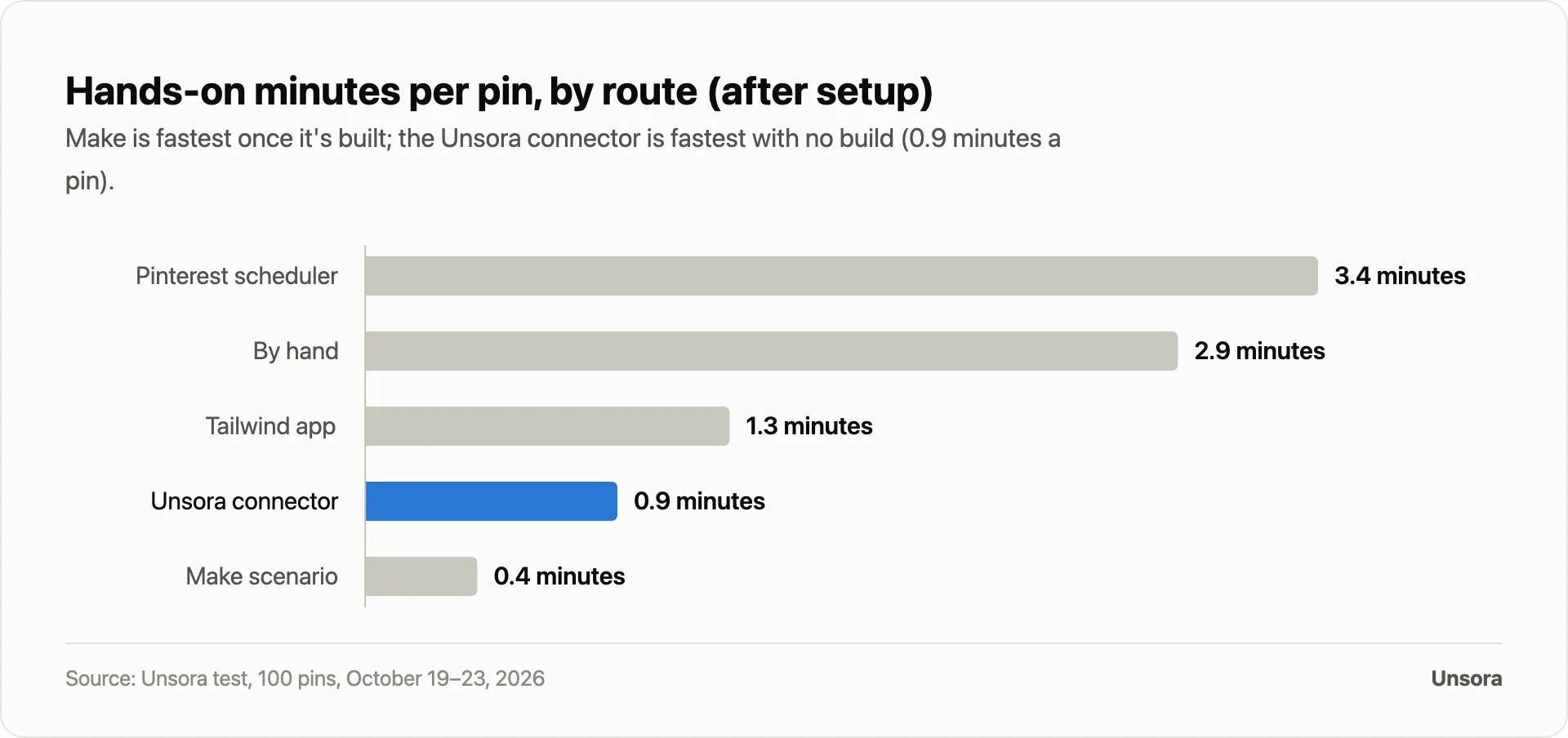
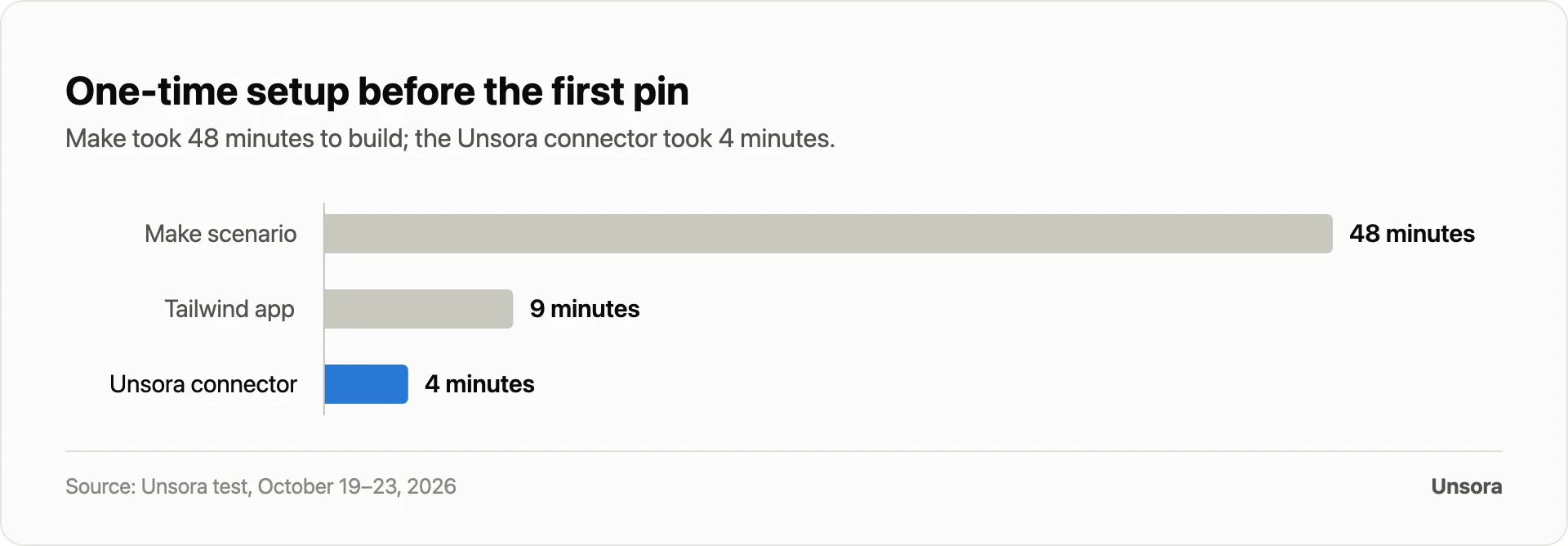
What this means for you: by hand wins for a handful of pins; a connector fits a weekly batch from ChatGPT; Make pays off at hundreds of pins on one template.
Where Unsora lands
- Best for: creators and social media managers already in ChatGPT who post the same content to Pinterest and beyond.
- Trade-off: two paid plans (ChatGPT and Unsora), and a finished Make scenario is faster per pin.
- Proof: in our test, 20 pins in 22 minutes, setup included; 1 of 20 needed a fix.
How do you connect ChatGPT to Pinterest with Unsora?
Register Unsora in ChatGPT as a custom MCP server, link Pinterest in Unsora, then tell ChatGPT to publish.
Check two things first: Unsora posts from ChatGPT Plus and above, and posting takes a paid Unsora plan (3-day trial available).
Step 1: Add the connector
Open Plugins in ChatGPT, hit the plus button and pick Add custom MCP server. Paste in https://mcp.tryunsora.com/mcp, tick the risk box, choose Create as a plugin, then sign in.
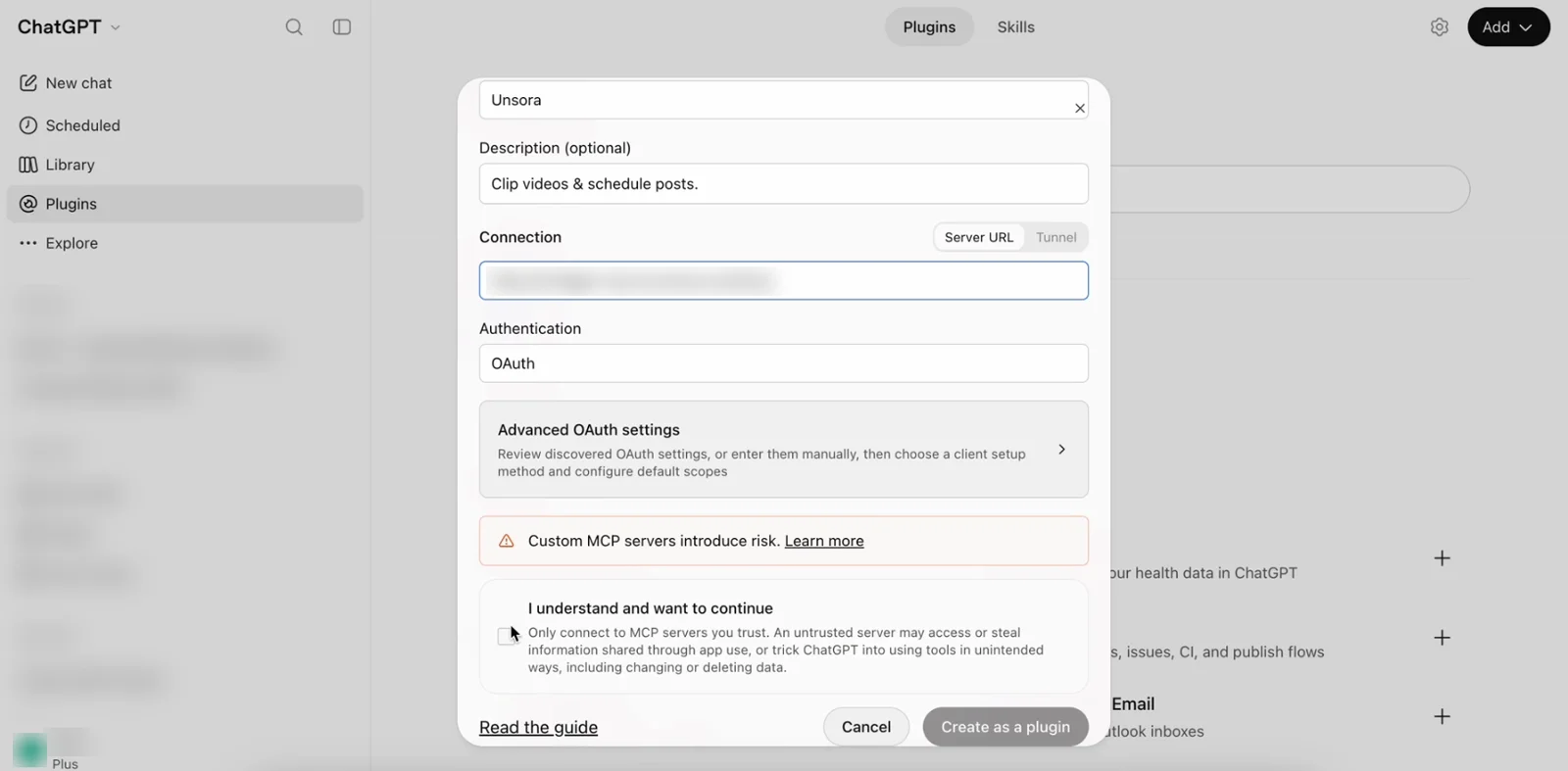
https://mcp.tryunsora.com/mcp.Step 2: Connect Pinterest and check ChatGPT sees it
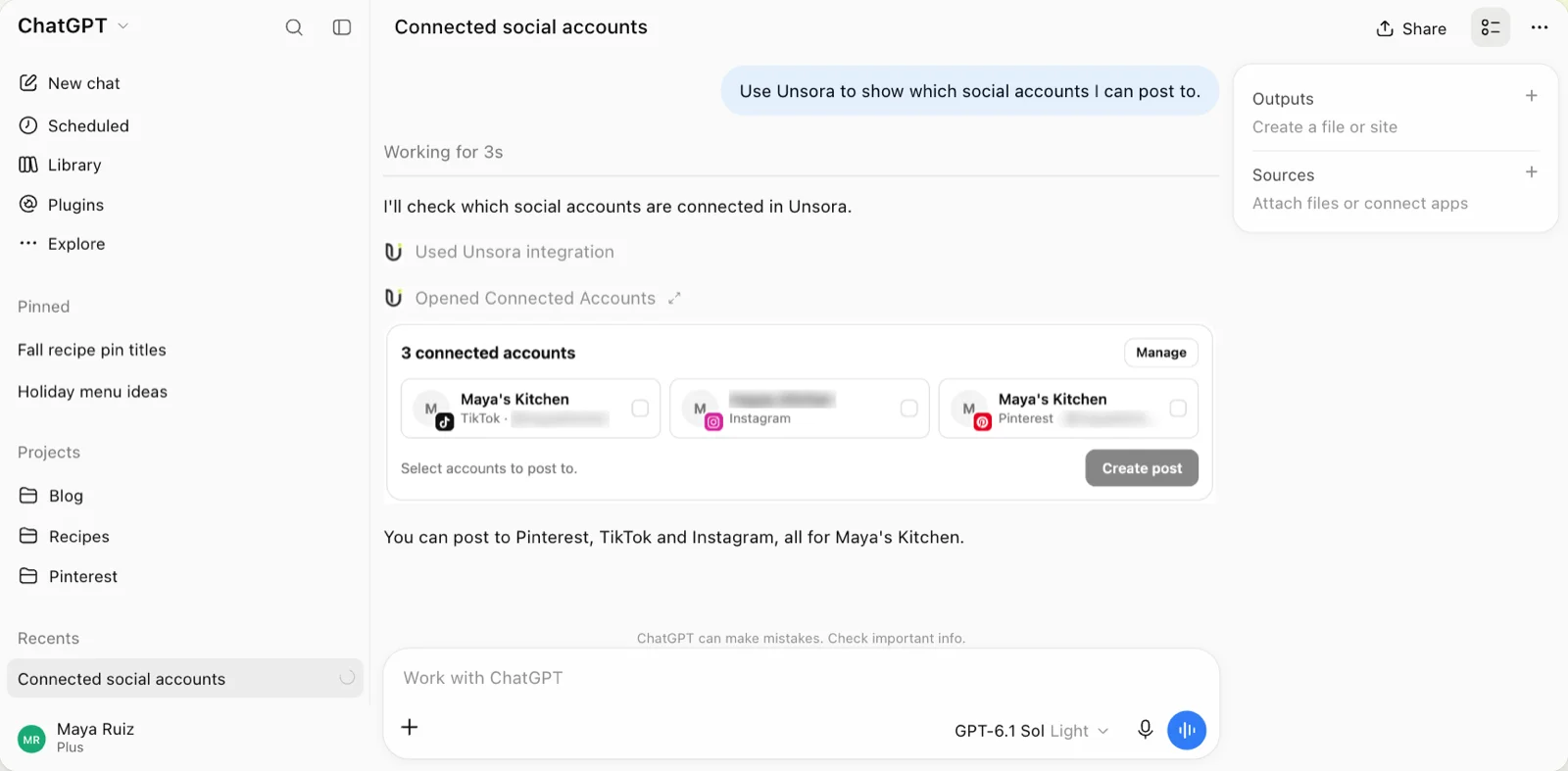
Link your Pinterest account in the Unsora app, then ask ChatGPT "which social accounts can you post to?". It calls get_accounts, which should list your Pinterest account.
Step 3: Ask it to post, then check it went out
Hand over the image, title, link, board and time. ChatGPT calls create_post and returns a status: saved for review, scheduled or published.
What should you type? Three prompts that work
Always tell the agent the board, the timing and whether to wait for approval: the connector does exactly what you write.
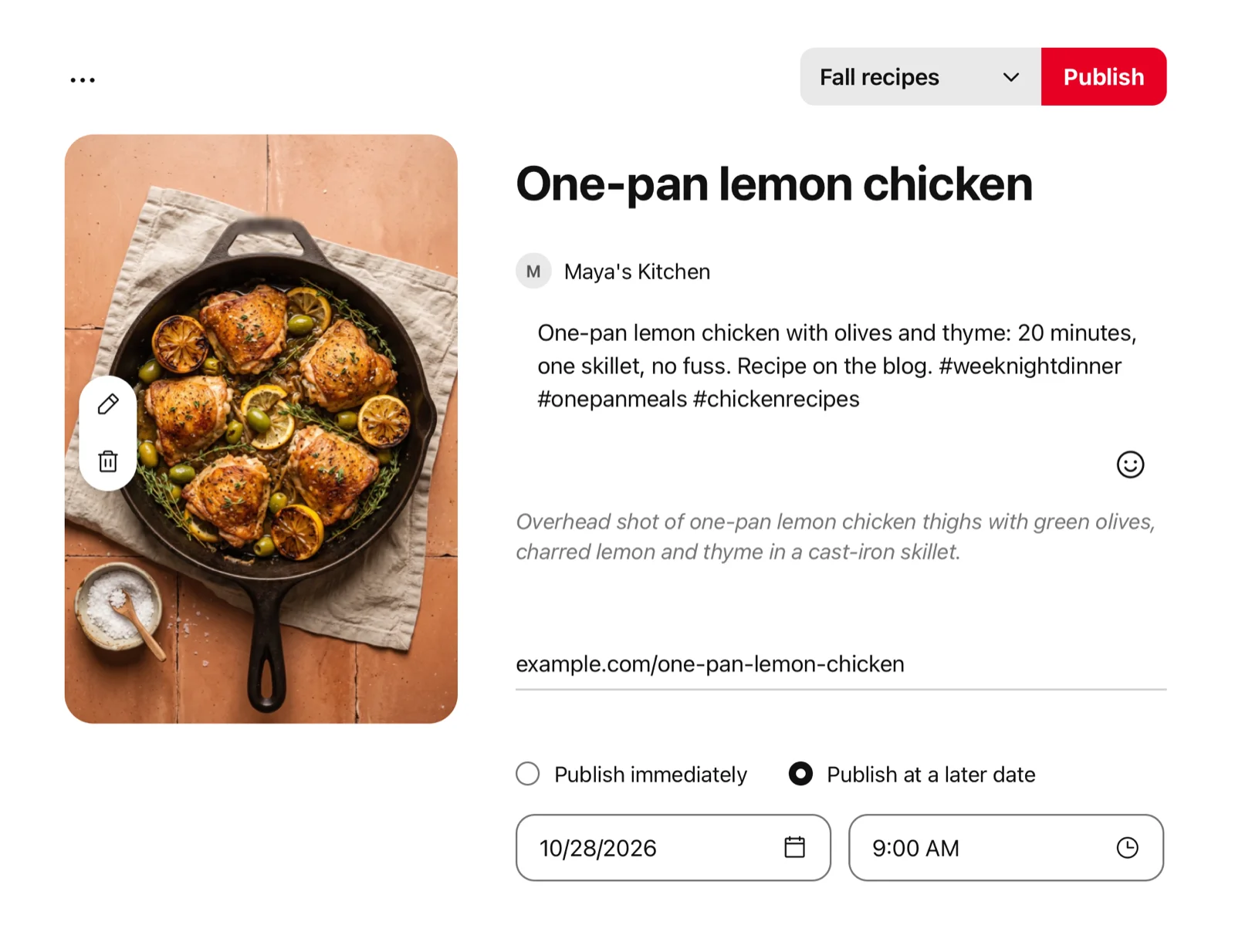
- 01Publish immediately:"Put this image on my Pinterest board 'Fall recipes' right away. Title: 'One-pan lemon chicken'."
- 02Queue a week:"Line up these 5 pins for 'Fall recipes', one per day at 9am Eastern, beginning tomorrow."
- 03Review first, two platforms:"Get this pin ready for Pinterest and the same image for Instagram with a shorter caption. Don't publish yet."
With the Schedule Post skill, the agent checks your plan and connected accounts first.
Can ChatGPT schedule pins, and how far ahead?
Yes. Through a connector, give ChatGPT a date and time and it schedules the pin. Pinterest's native scheduler caps at 30 days out and 10 pins.
Unsora needs at least 2 minutes of lead time to schedule. Skip the time and the post is saved unpublished; "publish now" sends it immediately. A single post reaches up to 10 connected accounts across Unsora's 8 platforms: YouTube, TikTok, Instagram, Facebook, LinkedIn, Pinterest, Bluesky and X (Create Post API).
What can't ChatGPT do on Pinterest, and is it safe?
It can't post without a connected account or bend Pinterest's rules, and it only uses the access you grant.
- No connection, no publishing.Remove Pinterest in Unsora or uninstall the plugin, and the agent can't publish.
- Approval:ask for posts to stay unpublished until you've reviewed them, then publish.
- Pinterest's rules still hold. Pins that violate Pinterest's Community guidelines come down whatever tool posted them, and AI-made pins draw pushback: one r/AskMarketing commenter said they shut down their Pinterest account over AI content.
- Mistakes:name the board in every prompt (our single Unsora fix came from skipping it). A file that breaks a platform's rules is rejected at publish; correct it and retry.
Which route should you pick? The Unsora Pin Route Check
Answer three questions in order: the agent you work in, whether Pinterest is your only platform, and whether you approve every pin.
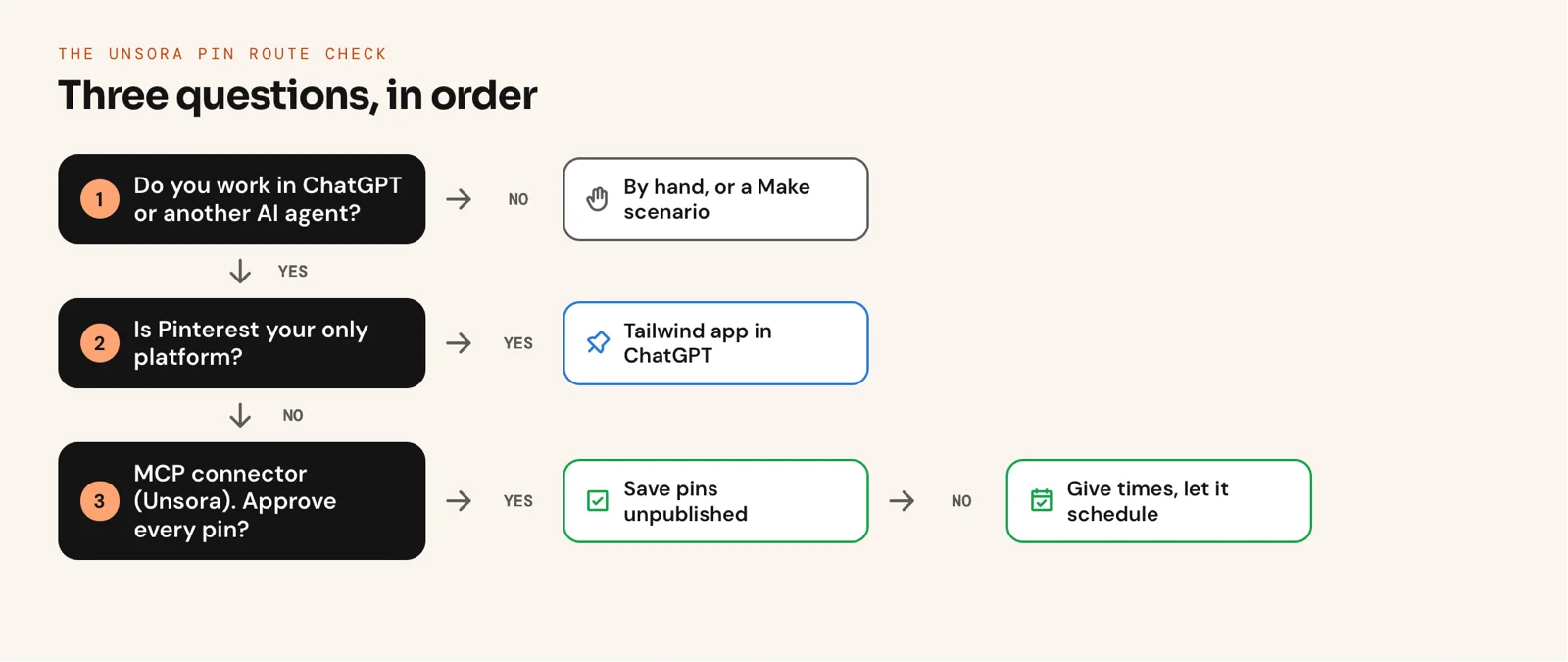
Tailwind wins on Pinterest depth, a general tool on keeping everything in one place, as one r/SocialMediaMarketing thread put it.
FAQ
Yes, by authorizing a connector such as Unsora, Tailwind or PinBridge.
If ChatGPT is publishing for you, yes: Unsora works on ChatGPT Plus and above, with a paid Unsora plan. Tailwind and similar apps vary by plan and region; manual posting works on any plan.
Go with Unsora for one chat publishing to Pinterest and your other networks; in our test it handled 20 pins in 22 minutes. Choose Tailwind if Pinterest is your only channel, and Make for hundreds of pins from a spreadsheet.
Yes. Ask for a vertical 2:3 image, or let Unsora generate it in the same chat.
Yes. Unsora adapts the image to each platform as it publishes; 4:5 looks best on Instagram.
Irfan Sadek co-founded Unsora and works as a software developer. LinkedIn
Related: the Unsora connector · Unsora's MCP server · Schedule Post skill